The best roofing CRM software for contractors in 2026
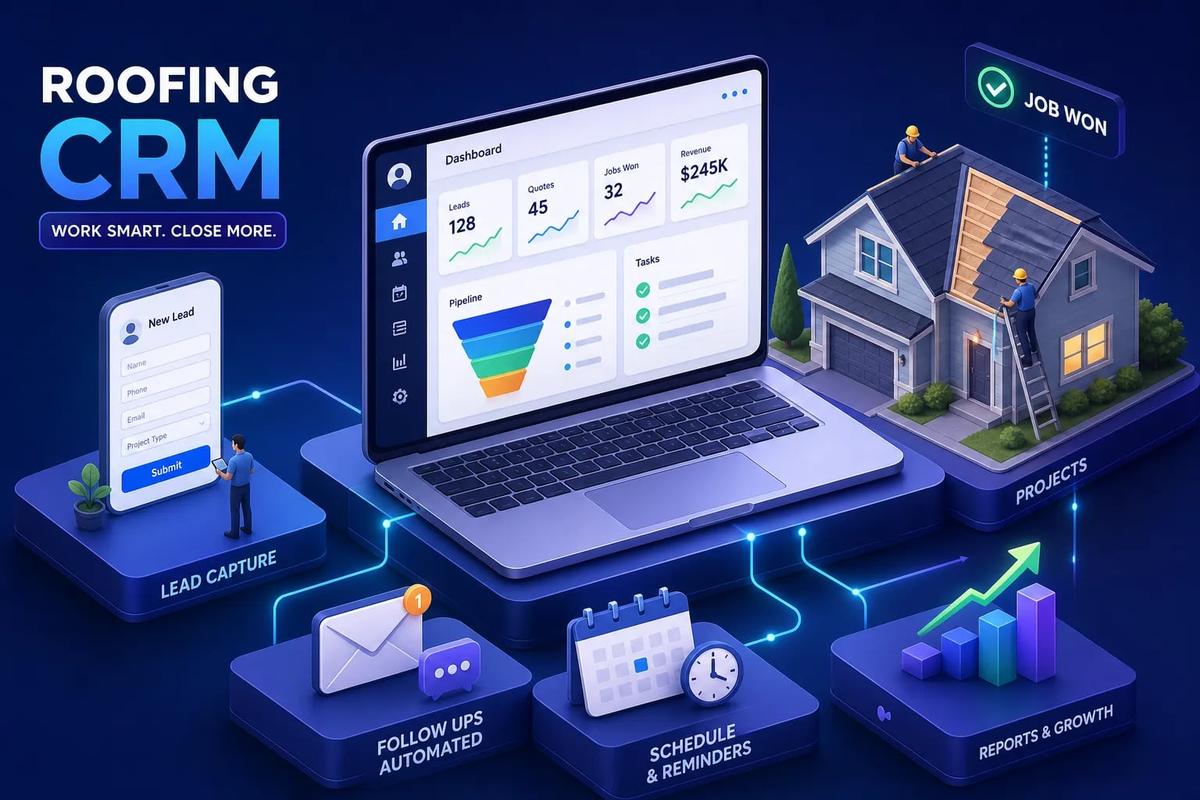
Most roofing contractors aren't losing jobs because of bad salespeople. Many report that software and workflow gaps are a primary contributor to lost business, and it's easy to see why. Their roofing CRM software was built for a SaaS startup, not a crew chasing insurance adjusters and climbing roofs in August. A generic contact manager doesn't know what a square of shingles costs. It typically can't convert a signed contract into a crew dispatch or fire an invoice when the job closes. It just stores names and calls itself a CRM.
The right roofing management software does something fundamentally different. It's built around the actual workflow: lead intake, estimate follow-up, contract signing, crew scheduling, and payment collection. Every step connects to the next one. Nothing falls through a gap between tools.
That's the architecture URBLD was designed around. Rather than building a standalone contact database, the CRM sits inside a connected operating system where every module shares the same data layer, no re-entry, no sync jobs, no gaps. That's a different way of thinking about the problem, and it matters at scale. But before you choose any platform, you need to understand what roofing-specific software actually has to do, what the options look like in 2026, and which tier matches your operation. That's what this guide covers.
What roofing CRM software actually needs to do
Before you compare platforms, get clear on the four things any roofing CRM must handle to earn its monthly fee. These aren't abstract features. They're the four steps that move a job from first contact to final payment without someone manually carrying information from one tool to the next.
Lead tracking from first contact to signed contract
Real lead tracking for a roofing company means source attribution: which ad, storm event, canvass, or referral brought this person in. It means automatic routing to the right rep or workstation based on territory, job type, or lead score. And it means a visible pipeline where you can see exactly where every lead sits right now. A contact record that stores a name and phone number isn't real lead management. The system needs to track activity, follow-up history, and stage movement, not just store data.
Estimate follow-up that runs without you
Roofing estimates don't close themselves. The window between sending an estimate and chasing it manually is where most contractors lose jobs they should have won. Automated follow-up means timed reminders, email and SMS sequences triggered by estimate status, and escalation rules when a prospect goes cold, for example, after five days of silence. That sequence should run without anyone remembering to do it. If you're manually following up on every open estimate, you're doing the roofing CRM's job yourself.
Contract management and e-signatures built in
Sending a PDF over email, waiting for a print-sign-scan cycle, then re-uploading it to a folder is not a feature. It's a gap dressed up as a process. Native contract handling in a roofing business software platform means document creation from templates, digital signing that works on a phone, and centralized storage with a complete audit trail. When this lives inside the platform, a signed contract can immediately trigger the next step. When it's handled outside the platform, it's a manual handoff every time. Verify with any vendor that mobile e-signing is native and not routed through a third-party add-on.
Payment collection that closes the revenue loop
The job isn't done when the contract is signed. A contractor CRM or management system that stops at the signature and hands off to a disconnected accounting tool leaves the most important step unsupported. Deposit collection, progress billing for multi-phase jobs, and automatic invoice generation on job completion should all connect back to the same job record. When job completion fires the invoice automatically, cash flow improves without anyone doing extra work.
Why generic CRMs keep failing roofing contractors
HubSpot and Salesforce were built for software companies. They track emails, log calls, and move deals through stages. They do that well. What they don't do is understand what happens between the signed estimate and the final payment on a roofing job, and contractors who try to force that workflow into a general-purpose tool pay for it every day.
They track contacts, not roofing workflows
Generic CRMs are built around a "deal" concept. A roofing business doesn't have deals. It has leads, site assessments, aerial measurements, insurance claims, permits, material orders, crew assignments, inspections, and final invoices. The workflow is specific enough that building it inside a horizontal tool requires heavy customization. That customization costs more than the software, takes months to build, and breaks whenever the vendor updates their platform. Contractors who've tried this route usually describe it the same way: it worked until it didn't.
The integration tax
The real cost of stitching tools together isn't the subscription fees. It's the daily overhead of managing the gaps between them. A general CRM for leads, a separate roofing estimating software tool, a document platform for contracts, and a payment processor add up to four subscriptions and four places where data has to be moved manually. When a lead converts to an estimate, someone re-enters the data. When an estimate becomes a contract, someone copies it somewhere else. When the job closes, someone generates the invoice in the accounting tool. That's the integration tax, and it compounds as the business grows.
What a native operating system looks like instead
Some platforms are built on a different architecture. Rather than connecting separate modules through integrations, they share a single data layer across CRM, estimating, contracts, dispatch, and invoicing. Lead data flows into an estimate without re-entry. The signed contract triggers crew scheduling. Job completion fires the invoice automatically. URBLD is designed around this model: according to its product architecture, the CRM is one module inside a connected operating system, not the whole system. For contractors who have hit the ceiling on what patched-together tools can do, this roofing project management platform approach is a practical alternative worth evaluating.
How to choose roofing CRM software in 2026: top platforms compared
This isn't a ranked list. Every platform here has a natural home in a specific type of operation. The goal is to show you what each one does well and where it has gaps so you can narrow the field before you spend time on demos.
JobNimbus: the roofing-native workhorse
JobNimbus is one of the more complete roofing-specific platforms in the mid-market. It handles CRM and lead tracking with custom sales pipelines, estimate creation and conversion to invoices, calendar-based scheduling for crews and appointments, and a solid iOS and Android app for field updates, photos, and payments. Pricing runs from around $225 to $550 per month depending on team size and tier, with a 14-day trial available. For contractors who need a dedicated roofing platform without enterprise pricing, it's a solid starting point. The gaps worth asking about are advanced automation and native e-signatures, where some workflows may still point you toward third-party tools.
AccuLynx: built for larger operations
AccuLynx scales to larger roofing businesses and covers the full job lifecycle: lead tracking with AI-powered lead intelligence and drag-and-drop pipeline management, aerial measurement integrations, crew scheduling with a centralized calendar, and QuickBooks Desktop and Online sync for billing and invoicing. Starting price is around $250 per month, with higher tiers going custom and quote-based. The demo-led sales process with no public self-serve trial signals enterprise positioning. If you're running a large operation and need robust production scheduling with QuickBooks sync, AccuLynx is worth a demo. If you're a smaller crew evaluating options quickly, the lack of a trial is a friction point.
Roofr, Leap, and Jobber: where each one fits
These three serve distinct profiles. Roofr has a free starter tier and leads on measurement and estimating workflows, making it a practical fit for contractors whose bottleneck is getting polished proposals out fast. Leap starts at $79 per month and is accessible for smaller crews who need basic pipeline and estimating without a steep learning curve. Jobber at $39 per month for the core tier is a general field service tool, solid for basic scheduling and invoicing but not built for roofing-specific workflows. It works for contractors who need something simple and inexpensive and can live without roofing-native features.
What you're actually paying across pricing tiers
Pricing in this category spans a wide range, and where you land should be driven by the volume your business does and the workflows you need covered. Here's how the tiers break down in practice.
Entry-level options under $100/month
QuoteIQ starts at $29.99 per month. Roofr's paid plans run around $99 to $109 per month after the free starter. Jobber Core is $39 per month. Leap Essential is $79 per month. These are legitimate starting points for solo operators or very small crews. What you give up is depth: limited pipeline automation, fewer integration options, and feature ceilings you'll hit if the business grows. They're not long-term platforms for contractors doing serious volume, but they're better than spreadsheets and a general-purpose contact manager.
Mid-market roofing CRM software from $225 to $550/month
This is where JobNimbus and AccuLynx Essential live, and the price jump buys real capability: deeper pipeline management, estimating workflows, scheduling that connects to dispatch, and accounting sync. For a contractor doing $1 million or more in annual revenue, the ROI math on this tier is worth calculating. Consider a scenario where one closed job, with an average ticket of $15,000 to $25,000, would have gone cold without automated follow-up: that single win covers two to three months of platform cost. This is the tier where operational efficiency starts to compound.
Enterprise pricing and when it makes sense
ServiceTitan runs roughly $245 to $500 or more per technician per month on custom contracts. Buildertrend tiers run from $499 to $1,099 per month. These numbers are defensible for multi-location operations running 20 or more technicians with complex reporting needs. For most roofing contractors, this tier is a decision to make when the business has outgrown the mid-market options, not before. Paying enterprise rates for workflows a mid-market platform handles fine is just overhead.
Integration reality: accounting, estimating, and supplier connections
Every platform claims to integrate with QuickBooks. What that actually means varies significantly, and the difference matters when you're deciding whether a platform genuinely closes the revenue loop or just exports data in one direction.
QuickBooks and Xero sync: two-way vs. one-way matters
A real bidirectional sync moves contacts, invoices, payments, and job costs between both systems and reflects updates in real time or near-real time. A one-way export pushes data from the roofing CRM software to QuickBooks but doesn't pull changes back. JobNimbus documents a two-way sync, but with field-specific exceptions: a job name change in JobNimbus, for example, doesn't always update in QuickBooks. Sync timing is also batch-based rather than instantaneous, which is worth knowing if your team relies on real-time accuracy. Ask any vendor specifically: is the sync two-way, what fields are covered, and how frequently does it run?
Measurement tools and estimating workflow connections
EagleView, HOVER, and GAF QuickMeasure integrations allow measurement data to flow directly into a proposal without manual re-entry. This is where the roofing estimating software step becomes genuinely fast rather than fast-looking. When the measurement feeds the estimate automatically, one step in the workflow collapses. The contractors who close estimates quickly are usually the ones who've removed the manual measurement-to-proposal translation from the process entirely.
Supplier ordering and material tracking
Integrations with ABC Supply, SRS Distribution, and QXO can let contractors tie material orders and costs back to the job record without switching systems, though availability varies by platform, so confirm during any demo. This is less universal than accounting or measurement integrations. For contractors doing high volume with consistent suppliers, the ability to reference material costs against the job record without re-entry is a meaningful time saver.
Matching a platform to your company size and workflow
The shortlist logic is simple. Don't over-buy features you won't use for two years. Don't under-buy and hit the ceiling in six months. Here's how to match the tier to your operation.
Solo operator or small crew (1, 5 people)
Roofr or Jobber at the entry tier makes sense here. The priority is getting leads tracked, estimates sent, and invoices collected without a steep learning curve or high monthly overhead. A $39 to $109 per month platform that your team actually uses beats a $400 per month platform nobody has time to learn. Start simple, get the fundamentals working, and move up when you need to.
Growing contractor (5, 20 people)
This is the JobNimbus and Leap tier. Pipeline visibility matters now because leads are coming from multiple sources and more than one person is managing follow-up. Automated follow-ups and scheduling that connects to dispatch start paying for themselves when your office staff spends less time doing manual handoffs between tools. The integration gaps start mattering more here because re-entry between systems is a daily tax, not an occasional inconvenience.
Multi-crew or multi-location operation (20+ people)
AccuLynx, ServiceTitan, or a platform like URBLD built as a connected operating system. At this scale, disconnected tools create compounding operational drag. Every manual handoff between systems multiplies across more jobs, more crews, and more daily decisions. The right call is a platform where CRM, scheduling, estimating, contracts, invoicing, and crew management share the same data, not six tools synced through a workflow automation that breaks when the vendor updates an API.
ROI you can realistically expect
The research here is specific enough to be useful. These are numbers contractors and vendors have self-reported under clean implementations, meaning mapped workflows, trained staff, and automation actually running, not just configured.
Close rate and revenue impact
Contractors switching from manual tracking or generic CRMs to a roofing-specific platform self-report close-rate improvements of 20% to 45% depending on their baseline. For a $2 million roofing company with a clean implementation, that translates to roughly $300,000 to $600,000 in incremental first-year revenue. Clean implementation means mapped workflows, trained staff, and follow-up automation actually turned on and running, not just configured and ignored. The platform doesn't produce the ROI; the process does. The platform makes the process repeatable.
Time saved in scheduling, invoicing, and follow-up
The onboarding effort on a mid-market implementation runs about 45 to 55 hours total, including data cleanup, workflow configuration, and training. That's a one-time cost against ongoing weekly savings. Contractors who invoice on the day of service completion get paid an average of 14 days faster, with typical payment windows dropping from 21 to 30 days down to 7 to 14 days after automation. That kind of cash flow improvement is worth more than most contractors expect when they run the math on a full year of jobs.
How to evaluate, trial, and implement your chosen platform
The decision process matters as much as the decision. Most platforms look good in a demo. The real evaluation happens when you run your actual workflow through the system before you commit.
What to test in a free trial
Skip the feature tour. During any trial, run this sequence with real data: enter an actual lead, build a real estimate, send it to yourself, trigger a follow-up, convert it to a contract, and try to close out a fake job with an invoice. If any step in that sequence is clunky, unclear, or requires a workaround, that's the platform telling you something important. Most platforms fall apart in real use when the workflow doesn't match how you actually work, and a 14-day trial with your own data reveals that faster than any demo.
Implementation timeline and common migration traps
Set realistic expectations: 6 to 10 weeks for a mid-market implementation, 45 to 55 hours of total effort. The three biggest migration traps are dirty legacy data (clean it before you import, not after), training everyone on every feature instead of training each role on what they actually use, and going live in peak season when nobody has bandwidth to absorb change. If your busiest months are June through September, plan a spring or fall implementation. A slow-season go-live with a focused team beats a peak-season rollout where half the features never get adopted.
A practical checklist before you sign
Answer these questions before you commit to any platform:
- Does it handle all four core workflows natively: lead tracking, estimating, contract signing, and payment collection?
- Is the QuickBooks sync bidirectional and does it cover invoices, payments, and job costs, or just invoices?
- Is there a trial you can run with real data, not just a guided demo?
- What does implementation support actually include: dedicated onboarding, documentation, or a ticket queue?
- Can you exit the contract without a multi-year penalty if the platform doesn't work for your team?
The right roofing CRM software isn't the one with the most features. It's the one your crew will actually use every day. Complexity that never gets adopted is just overhead with a monthly fee attached.
The platform needs to match the workflow, not the other way around
Roofing is a specific business with a specific workflow. The software needs to fit that workflow out of the box, not after six months of customization. A general CRM built for software sales teams will never natively understand the distance between a signed estimate and a completed installation. A roofing-native platform built around that distance handles it by default.
The shortlist logic comes down to three buckets: entry-level platforms like Roofr and Jobber for small crews who need fundamentals without complexity, mid-market roofing CRM software like JobNimbus for growing contractors who need pipeline visibility and automation, and connected operating systems like URBLD for multi-crew or multi-location operations where disconnected tools create compounding drag. Match the tier to where your business is today, with room to grow into where it's headed in the next two years.
Contractors who adopt connected platforms report that every step from lead to payment runs without manual handoffs, and that operational clarity compounds over time. If your current setup requires someone to manually carry information between steps, that's exactly the problem the right roofing CRM software solves. Reach out to our team at URBLD to see how a connected operating system handles the full roofing workflow in a single platform.
Related articles
Estimate forms for contractors: build one right
Estimate forms for contractors don't have to be a time sink. Learn the right fields, pricing math, and formats, and see how URBLD builds them from photos.
Best Lead Management Software for Field Service in 2026
Compare the best lead management software for field service businesses. See which features, pricing tiers, and platforms keep every lead on track to a booked job.

Best Software for HVAC Contractors: A 2026 Buyer's Guide
Find the best software for HVAC businesses in 2026. Compare top platforms by features, size fit, and pricing, then use our 5-step checklist to choose fast.

Best Facebook Lead Capture Software for Service Businesses
Compare the best Facebook lead capture software for home service businesses. See which tools connect Meta lead ads to your CRM, scheduling, and follow-up automatically.
How Many AC Tons Per Square Foot Does Your Home Need?
Find out how many AC tons per square foot your home needs with a simple sizing chart, climate and insulation adjustments, and tips on when to get a Manual J calc.

ServiceTitan vs Jobber vs All-in-One: Which Wins?
ServiceTitan vs Jobber vs all-in-one platforms compared on pricing, features, integrations, and scalability. Find out which field service software fits your business.
Found this useful? Share it with another contractor or service business owner.