Unified Inbox & Client Communication Platform for Service Businesses
URBLD combines phone, SMS, email, AI receptionist, internal team chat, and a client portal into one centralized communication platform — with every conversation automatically linked to the right lead, customer, estimate, or job.
No credit card required · 14-day trial
URBLD combines phone, SMS, email, AI receptionist, internal team chat, and a client portal into one centralized communication platform — with every conversation automatically linked to the right lead, customer, estimate, or job.
- Roofing companies
- HVAC companies
- Plumbing companies
- Electricians
- Landscapers
- General contractors
- How the feature works
- Who it's built for
- How it connects to the rest of URBLD
- FAQs and related pages
- One connected record across CRM, jobs, and billing
- AI receptionist and follow-up built in
- Field, office, and AI on the same thread
- Trade-specific workflows, not a generic CRM
- E-signature, PDF, and payments included
- Replaces 6+ disconnected tools
What is a unified inbox for service businesses?
URBLD Unified Inbox is a unified inbox for service businesses that centralizes SMS, email, AI conversations, internal team chat, and customer messages into one operational workspace. Every conversation auto-links to the correct lead, customer, employee, subcontractor, or job record — so office staff, field crews, and AI agents work from the same thread.
URBLD combines phone, SMS, email, customer messaging, AI receptionist conversations, internal team chat, and client portal communication into one centralized inbox for service businesses. Every conversation is automatically linked to the right lead, customer, job, estimate, or invoice — so sales, dispatch, office, and field teams never lose context between departments.
Built for contractors and field service companies running multi-rep sales teams, dispatchers, office staff, and field crews who need shared visibility — not fragmented personal inboxes. Replaces personal-phone texting, scattered email accounts, group chats, and bolted-on CRM messaging with one operational communication platform.
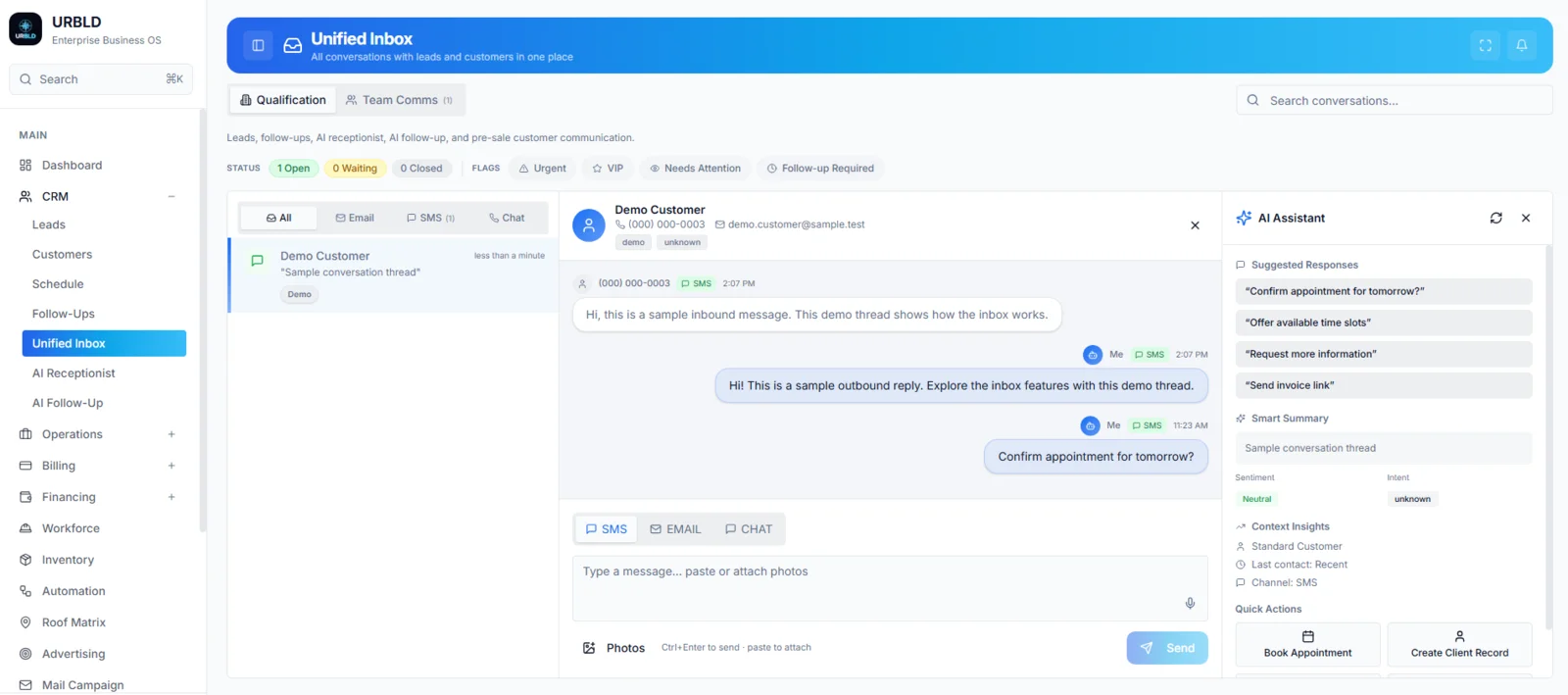
Every customer conversation in one thread
SMS, email, chat, and AI receptionist conversations — all in one inbox, automatically linked to the right lead or customer record. No more hunting through personal phones, email folders, or call logs.
Why service companies lose customer conversations
The problem isn't that your team doesn't communicate — it's that communication is fragmented across personal phones, separate email accounts, sticky notes, group texts, and apps that don't talk to each other. Customers repeat themselves. Reps lose context. Owners lose visibility.
70%+
Of service business conversations happen off-record
Reps text customers from personal phones, email threads scatter across staff inboxes, and crew chats live in WhatsApp. When a rep leaves, the relationship leaves with them.
Every channel
Funneled into one shared workspace
SMS, email, phone, chat, AI receptionist, internal team groups — all unified inside the CRM and automatically attached to the right lead, customer, estimate, or job.
Every action
Logged with user, timestamp, and record link
Sales managers, dispatchers, and owners get full visibility into every customer touchpoint. Nothing happens off-record. Nothing gets lost when a rep leaves.
The difference isn't another messaging app. It's communication infrastructure built into the operating system that runs your business.
See how URBLD ties communication to the rest of your operationUnified Inbox
Every SMS, email, call, and AI conversation in one shared workspace.
Team Comms
Internal group chat with @mentions, replies, reactions, and photos.
Photos & Attachments
Attach photos and files to conversations, jobs, and customer records.
Operational Audit Trail
Every message timestamped, attributed, and tied to the right entity.
What Is Unified Inbox Software?
Unified inbox software for service businesses centralizes every customer-facing channel — SMS, email, phone, live chat, and AI receptionist — into one shared workspace, with each conversation automatically linked to the matching lead, customer, estimate, or job inside the CRM. Instead of reps texting from personal phones, dispatchers checking three different email accounts, and office staff hunting through call logs, the whole team operates from one timeline.
URBLD goes further than a typical CRM messaging plugin. It includes:
- A shared qualification inbox for sales, dispatch, and office staff
- WhatsApp-style internal team groups for office-to-field coordination
- Photo and file attachments linked to the right job or customer
- AI receptionist conversations streamed into the same inbox
- A customer-facing Client Portal for post-sale documentation
- Automatic record linking via phone number, email, and chat session
- A full audit trail with timestamp and user attribution on every action
URBLD treats communication as operational infrastructure — not a feature bolted onto a CRM. Every message, photo, and call is part of the customer record forever.
Used by roofing, HVAC, plumbing, electrical, construction, remodeling, and other service companies that need shared visibility across sales, dispatch, office, production, and billing.
Communication across the entire business
URBLD isn't just a customer messaging tool. It's a three-layer communication system covering everything from the first inbound text to the last internal crew conversation about a finished job.
Customer Communication
- SMS conversations from a tracked business line
- Inbound and outbound email threads
- Live chat sessions from your website
- AI receptionist conversations
- Lead qualification messaging
- Estimate follow-up and approvals
- Appointment confirmations and reminders
Internal Team Communication
- WhatsApp-style group chats (Management, Sales, Dispatch, Office, Crews)
- Office-to-field coordination
- Job-specific discussion threads
- @mention teammates with push notifications
- Reply to specific messages and react with emojis
- Share photos and files internally
- Mute, pin, and search any thread
Operational Communication History
- Every message logged to the customer record
- Conversations linked to jobs, leads, and estimates
- Photo and file attachments tied to the right entity
- Searchable timeline per customer
- Full audit trail with user and timestamp
- Survives rep turnover — no data leaves with them
- Manager visibility across every conversation
Unified Inbox for Sales, Dispatch, Office, and Field Teams
The same inbox serves every role inside a service business — each with the context they need, without forcing customers to repeat themselves.
Sales Reps
See every prior conversation, estimate, and follow-up before texting a lead back. Stop losing deals to forgotten threads.
Dispatchers
Coordinate appointment changes by SMS or chat with full visibility into the customer's job, address, and tech assignment.
Office Staff
Handle billing questions, document requests, and approval routing without juggling separate email accounts and phone lines.
Field Crews
Send job photos straight into the team chat — automatically attached to the right job for office review.
Communication Channels Supported
One workspace. Every channel a service business actually uses.
Client Portal for Post-Sale Communication
Once a deal is sold, customer communication shifts from the qualification inbox to the Client Portal — a secure, branded workspace where homeowners and commercial clients can access everything related to their project without downloading an app or creating an account.
- View signed contracts, estimates, change orders, and invoices
- Approve estimates and change orders digitally
- Receive job updates, photos, and milestone notifications
- Upload property photos, ID, or insurance documentation
- Message your team directly — replies land in the unified inbox
- Pay invoices and track payment history
- Access on any device — desktop, tablet, or mobile — no install required
The Client Portal is the post-sale equivalent of the qualification inbox — every interaction stays linked to the customer record so production, billing, and warranty teams operate from the same timeline.
Most CRMs store messages. URBLD organizes operations.
Traditional CRMs treat communication as a side feature. URBLD is built around the reality that conversations are the operation.
Typical CRM communication
- Texts disconnected from customer records
- Reps using personal phones — data leaves with them
- No internal team chat — staff use Slack or WhatsApp
- No timeline tying conversations to jobs and estimates
- Photos and files scattered across email and group chats
- Inbox only — no customer-facing portal
- AI receptionist (if any) lives in a separate tool
URBLD Communications
- Every conversation linked to lead, customer, estimate, or job
- Reps text from a tracked business number — never personal
- Built-in WhatsApp-style internal Team Comms
- Full timeline per customer with user and timestamp
- Photos and files attached to the right job automatically
- Inbox + secure customer-facing Client Portal
- AI receptionist conversations stream into the same inbox
Communication across the full customer lifecycle
URBLD covers every stage of the customer relationship — not just the first inbound message.
Before the appointment
- Inbound lead capture (web, ads, calls)
- AI receptionist qualification
- Two-way SMS confirmations
- Appointment reminders
- Pre-visit instructions and ETAs
During the job
- Field crew photo uploads
- Office-to-field group chat
- Customer status updates
- Change order approvals
- Job milestone notifications
After the sale
- Client Portal document access
- Invoice and payment messaging
- Warranty and follow-up communication
- Review request automation
- Long-term customer history retention
Photos, attachments, and operational documentation
Service businesses run on photos. Damage photos before a roof replacement. Material confirmation shots. Job site progress updates. Sign-off photos for warranty claims. URBLD treats photo and file attachments as first-class operational data — not just chat decoration.
- Field crews send photos straight from the team chat into the right job folder
- Customers upload property photos, ID, or insurance docs through the Client Portal
- Sales reps attach estimate photos and reference images during qualification
- Office staff review every uploaded file from one searchable timeline
- Every photo is tied to the lead, customer, or job — not stuck inside a private chat
- Audit trail tracks who uploaded each file and when
Connected to the rest of your operation
The Unified Inbox is one layer inside the URBLD operating system. Every conversation flows directly into the systems that run the business.
CRM
Lead and customer records that every message attaches to.
Follow-Ups
Recovery and negotiation queues fed by inbox activity.
Scheduling
Appointment reminders and dispatch coordination.
AI Receptionist
AI conversations streamed into the same inbox.
Estimates & Invoicing
Quote and payment messaging linked to financial records.
Who Uses URBLD Communications?
Service businesses where communication fragmentation directly costs revenue and operational visibility, including:
- Roofing companies coordinating sales reps, crews, and adjusters
- HVAC companies handling high inbound call and SMS volume
- Plumbing and electrical contractors managing emergency dispatch
- Construction and remodeling firms with multi-month projects
- Solar, windows, and exterior remodelers running consultative sales
- Field service businesses with office and field team coordination needs
If your team is using personal phones, group texts, separate email accounts, and a CRM that only stores notes — URBLD replaces all of that with one operational communication platform.
Unified communications guides
Neutral explanations of how customer and internal communication actually works — channels, consent, routing, ownership and delivery — no product required.
The enemy isn't another receptionist tool. It's disconnected intake.
Most operations don't lose deals to competitors. They lose them to fragmentation — calls, scheduling, dispatch, and follow-up running in unconnected systems with no shared lifecycle state.
Missed handoffs
Calls land in one tool, scheduling in another, CRM in a third. Context dies between systems.
No scheduling governance
AI bots write directly to calendars without dispatch validation — capacity, skill, and territory get violated.
Lost leads
Forms, voicemails, and SMS threads vanish into separate inboxes. No-one owns recovery. Pipeline leaks silently.
Zero operational memory
Each conversation is treated as an isolated event. Lifecycle state, prior intent, and authority history are discarded.
URBLD removes the re-entry layer.
Every call, message, and form arrives into the same operational fabric — linked to the right lifecycle state, governed by scheduler authority, validated by dispatch, and continued in the unified operational thread. There is no fragmentation to recover from because there is no fragmentation.
Real Results
100%
Conversations logged to CRM
< 30s
Context lookup time
1
Inbox for sales, ops, and team
3×
Faster customer response time
Frequently Asked Questions
Straight answers about how URBLD runs the business end-to-end.