Contractor lead management: 9 proven ways to close more jobs
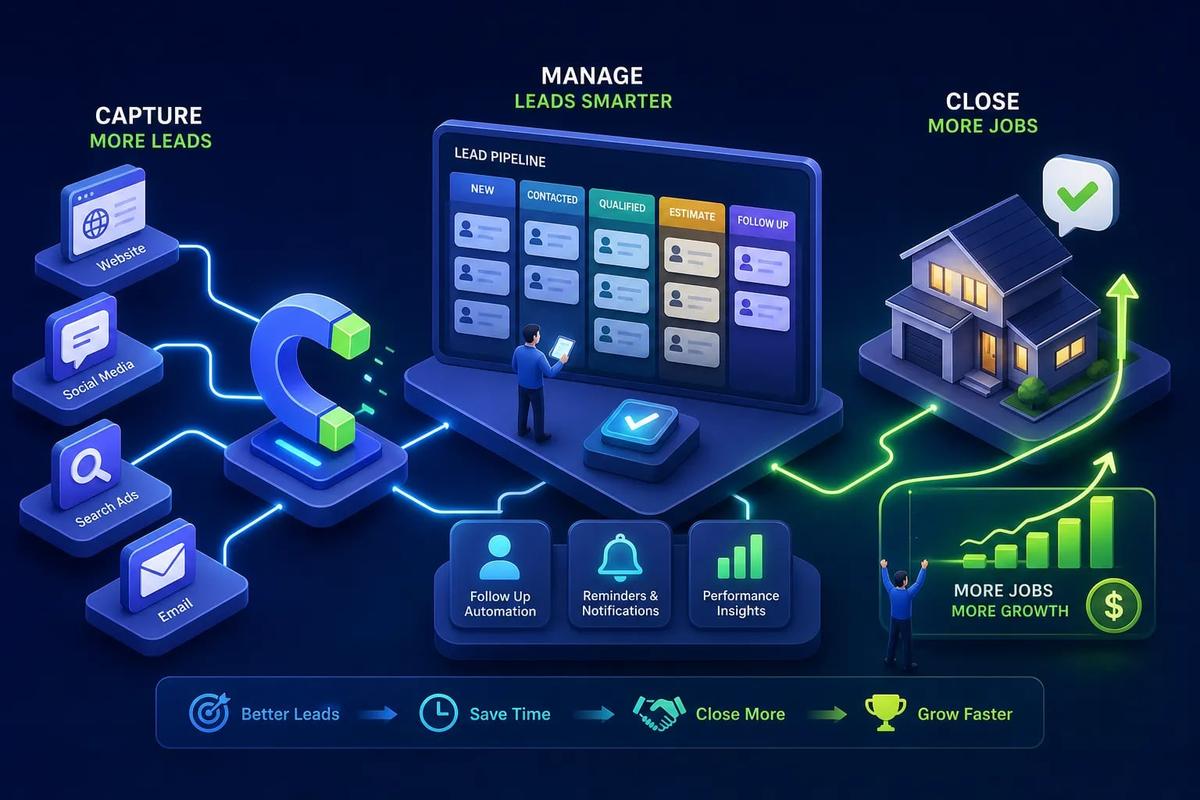
Most contractors don't lose jobs because of bad work. They lose them because a lead came in on a Tuesday afternoon, nobody followed up until Thursday, and by then the homeowner had already signed with someone else. That's not a sales problem, it's a contractor lead management problem.
The benchmark is unambiguous: the average contractor takes over 42 minutes to respond to a new lead. The window for winning that job is under 5 minutes. That 37-minute gap is where revenue disappears quietly, every single week. Some platforms, like URBLD, are built so that tracking and converting leads isn't a separate activity bolted onto everything else, it runs inside the entire job cycle, from the first inquiry to the final invoice. Whether you use one platform or several, the mechanics below are what close more jobs.
1. Why contractors lose leads before the job ever starts
The real culprit is fragmented tools, not effort
Most contractors are not lazy about follow-up. They check their email. They respond to texts. The problem is they're doing it across four or five disconnected places at once. A lead comes in through a web form, gets emailed to a shared inbox, gets buried in a thread, and never makes it into a CRM. The effort is there. The system isn't. Tool fragmentation, not attitude, is the root cause of most lead loss in contracting businesses.
What a missed lead actually costs
Run the math plainly. The average residential contracting job runs between $8,000 and $15,000. A contractor with a 28% inbound conversion rate who misses just 10 leads per month is losing multiple real jobs every 30 days. That adds up to somewhere between $45,000 and $120,000 in annual revenue, not from doing bad work, but from slow or absent follow-up.
Why speed-to-lead changes everything
Leads contacted within 5 minutes convert at dramatically higher rates than leads contacted after 30 minutes or more. After an hour, the odds of a meaningful conversation drop sharply. The homeowner has moved on, started another search, or already spoken to a competitor who picked up the phone. The 5-minute benchmark isn't aspirational. It's the actual threshold where the math changes.
2. How to capture every lead before it slips through the cracks
Setting up multi-channel capture from the start
Job leads for contractors arrive through inbound phone calls, website contact forms, paid ad landing pages, and referrals. Each channel needs a defined capture path. A phone call that goes to voicemail with no follow-up trigger is a lead that's already half-lost. Every channel should route into one centralized place, not into a person's memory or a shared inbox that gets checked twice a day.
Connecting ad attribution to your lead records
This is the detail most contractors skip entirely. When a lead comes in from a Google Local Services ad or a Facebook campaign, that source data needs to travel with the lead record through the entire pipeline. Without attribution, you have no way to know which marketing dollars are generating real jobs versus generating tire-kickers. Native ad-to-lead tracking, built directly into your platform, outperforms manual UTM tagging bolted onto a separate CRM every time. The data has to flow automatically or it won't flow at all.
Handling after-hours and missed calls
A significant share of inbound leads arrive outside business hours. Referrals call on Saturday afternoon. Form submissions come in at 9 PM. Without a system that responds immediately, those leads sit cold until Monday morning. The fix isn't complicated: AI-powered answering, automated SMS responses, and call routing that triggers a follow-up sequence the moment a lead comes in. This isn't a premium add-on. It's the minimum required to compete seriously in 2026.
3. Contractor lead management: the follow-up cadence that gets responses
Why the first five minutes define the outcome
When a lead submits a form or calls and doesn't reach anyone, they're still mentally active, sitting with their phone, comparing options, maybe filling out another form for a different contractor. The window where that lead is warm is short. Measured in minutes, not hours. Automating the first touch isn't about replacing human connection. It's about staying in the conversation long enough for a human to take over.
A practical 14-day multi-touch sequence
The cadence the data supports looks like this:
- Within 5 minutes: Automated SMS plus a call attempt
- Within 60 minutes (no answer): A second text or voicemail
- Day 1: Email with a clear next step
- Days 2, 3: SMS check-ins
- Days 5, 7: A value-add message, photos of completed work, reviews, or a relevant FAQ
- Days 10, 14: A final breakup message
Five or more touches outperform two or three by a wide margin. According to research from InsideSales.com, five or more contact attempts produce an 80% contact rate, compared to roughly 10% with just two attempts.
What to say in each channel
SMS should be short, name the project, and end with one easy reply prompt: "Hi [Name], this is [Company]. Thanks for reaching out about your roof. I'm looking at your details now and will call shortly." Calls should open with the prospect's project type and move quickly to one clarifying question. Emails should include one specific value item, one clear next step, and nothing else. The breakup message, often the most underrated touch, keeps the door open without burning the relationship: "I'll close your file for now, but if you still need help with your project, reply here anytime." In practice, the breakup message consistently outperforms middle-of-sequence touches.
4. How to qualify leads so you stop chasing dead ends
The six criteria that predict whether a lead will close
The consistent qualifiers are: service area or location fit, project type and scope alignment, a realistic budget or access to financing, direct access to the decision-maker, a near-term timeline, and basic site feasibility. These aren't abstract concepts. They're the questions a well-run intake process asks in the first conversation or the first form fill. Contractors who qualify leads systematically stop spending hours building estimates for jobs that were never going to close.
Building a simple lead scoring system
Assign point values to each criterion. A practical model for residential construction looks like this:
- Service area match: 20 points
- Project type fit: 20 points
- Budget confirmed: 20 points
- Timeline within 30, 60 days: 15 points
- Confirmed decision-maker: 15 points
- Response to outreach: 10 points
Set a threshold, 60 or above, for immediate follow-up. Leads below 40 go into a light nurture sequence. Leads with a clear mismatch get declined or referred. The system makes the decision so your team doesn't have to rely on gut instinct every time.
How priority bands change the way you work the week
Sort leads into three bands: high-priority for immediate outreach, medium for the standard sequence, and low for limited automated effort. The goal isn't to turn away work. It's to make sure your best leads get your fastest response while the rest stay in motion through automation. A real pipeline reflects those bands visually, so anyone on the team knows exactly where a lead stands and what the next action is.
5. Building a contractor sales pipeline that moves
Defining your pipeline stages in terms your team actually uses
The classic pipeline stages, "lead, contacted, qualified, closed", rarely match how a contracting business actually works. Better stage names for contractors: New Inquiry, Attempted Contact, Qualified and Scheduled, Estimate Sent, Follow-Up Pending, Job Won, and Job Lost. Every lead should have a clear status that anyone on the team can see without asking. If your pipeline requires explanation every time someone looks at it, it's not working.
Why leads stall between estimate and close
This is where most contractor pipelines break down. An estimate goes out, the prospect goes quiet, and the contractor assumes they lost the job without ever following up. The activity-based approach fixes this: instead of waiting a set number of days, the next follow-up step triggers based on what the prospect actually did. Opened the estimate but didn't reply? That's a different follow-up message than someone who never opened it at all. Behavior should drive the sequence, not the calendar.
Keeping the sales pipeline connected to operations
A pipeline that ends at "job won" and then requires someone to re-enter that data into a scheduling tool is a broken system with a different name. When a sales pipeline for contractors isn't connected to scheduling, estimating, and invoicing, won jobs get delayed, data gets duplicated, and field crews show up without the context they need. The handoff between sales and operations should be one click, not a manual transfer.
6. KPIs every contractor should track to measure lead performance
The conversion benchmarks worth measuring against
Two numbers are worth anchoring to: the ServiceTitan 2025 benchmark puts top-performing home service contractors at 28% inbound lead-to-job conversion, while the broader home-services average sits around 7.8%. Use these as diagnostic tools. If you're below 15%, the problem is likely in qualification or follow-up cadence. If you're at or above 28%, the constraint has shifted to lead volume and the speed of your first response.
Response time and contact rate as operational metrics
Response time and contact rate are the two most actionable leading indicators in the pipeline. Target: under 5 minutes for the first automated touch, under 2 hours for a human follow-up on qualified leads. Contact rate measures what percentage of inbound leads you actually reach, not just attempt. These metrics move before conversion does. If your contact rate is low, your conversion rate cannot improve no matter how strong your follow-up message is. A low contact rate is the ceiling that everything else runs into first.
How to use data to find where your pipeline leaks
Run a simple stage-by-stage drop-off analysis. If 100 leads come in and 40 get to "estimate sent" but only 10 close, the problem is in the estimate-to-close stage, not capture. If 100 leads come in but only 30 reach "qualified," the first-response process or intake form is the leak. The data shows you where to fix first. Most contractors skip this entirely and end up optimizing the wrong stage while the real problem sits unaddressed upstream.
7. What to look for in contractor lead management software
The integrations that matter most for a contracting business
In priority order, the four critical integration areas are estimating, accounting, scheduling, and job management. Leads need to flow into quotes without re-entry. Customers, invoices, and job-costing need to sync with your accounting tool. The lead-to-job handoff should be one step. And the won lead should become an active project without manual duplication at any point. Most contractor CRMs handle one or two of these well and leave gaps in the rest.
Why standalone CRMs and FSM tools create their own problem
Most contractors start with a general-purpose CRM or a field service tool, then layer on integrations to fill the gaps. Every integration is a sync delay, a potential data mismatch, and another thing that breaks at the worst possible moment. When a lead lives in a CRM that doesn't talk to the scheduling tool, someone has to be the human bridge between the two systems. That human bridge is exactly where leads go quiet and jobs get delayed.
How URBLD approaches lead management differently
URBLD was built specifically around this problem. Rather than connecting lead management software to external tools through integrations, URBLD runs lead capture, CRM scoring, automated follow-up, estimating, scheduling, and invoicing inside a single execution layer. A lead that comes in through an ad flows through qualification, gets routed to an estimate, converts to a scheduled job, and triggers an invoice on completion, with no re-entry at any step. Other platforms manage leads in isolation. URBLD embeds contractor lead management into the full job lifecycle. That's a different architecture, not a feature comparison.
8. What changes when your leads connect to the full job lifecycle
The silo is the real problem, not the follow-up
Effective contractor lead management isn't just about following up faster. It's about building a system where the lead never lives in a separate place from the rest of the business. When lead data connects to job data, contractors stop re-entering the same customer information five times. They stop losing context between the sale and the field crew. They stop discovering at invoice time that the scope changed two weeks ago, and nobody updated the record.
The compounding effect of a connected system
The benefits build on each other. Faster follow-up increases contact rate. Better qualification improves conversion. Connected scheduling reduces job start delays. Automatic invoicing tightens cash flow. Each improvement builds on the last in a way that fragmented tools simply can't replicate. This is why the right construction CRM isn't just a contact database. It's the operating layer the whole business runs on.
What to do next
Audit your current lead lifecycle from the first inquiry to the final invoice. Find the first place where data stops flowing automatically, where someone has to copy information from one place to another, make a phone call to communicate a status, or check a different tool to see what happened. Fix that gap first. If every handoff is manual, that's the signal: the toolset needs to change, not just the process.
Close more jobs with better contractor lead management
Contractors don't lose jobs because of bad work. They lose them because their systems aren't built to handle leads the way good work deserves. The fix combines faster first response, a disciplined multi-touch follow-up sequence, a scoring system that separates real jobs from tire-kickers, and a pipeline connected directly to the rest of the business.
The benchmarks give you a clear target: respond within 5 minutes, run five or more follow-up touches across multiple channels, and connect your pipeline to estimating and scheduling. Contractors operating at that level are in the top tier. Most of your competitors aren't there yet. That gap is the opportunity.
If you want to see what it looks like when strong contractor lead management runs in one place, from the first ad click to the final invoice, URBLD was built exactly for that. One system, from first inquiry to final invoice, with no re-entry required. Reach out to the URBLD team to see how it works for your operation.
Explore the URBLD platform
CRM with Inventory Management
Glossary
Lead Qualification
Glossary
CRM
Feature pages
Jobs
Feature pages
How to Reduce Lead Loss in Service Businesses
Solutions
How to Stop Missed Follow-Ups From Costing Jobs
Solutions
Contractor Foreman Alternatives for Service Operators
Comparisons
HubSpot Alternatives for Contractors
Comparisons
Found this useful? Share it with another contractor or service business owner.