Top FSM Software for Contractors in 2026: 9 Best Picks
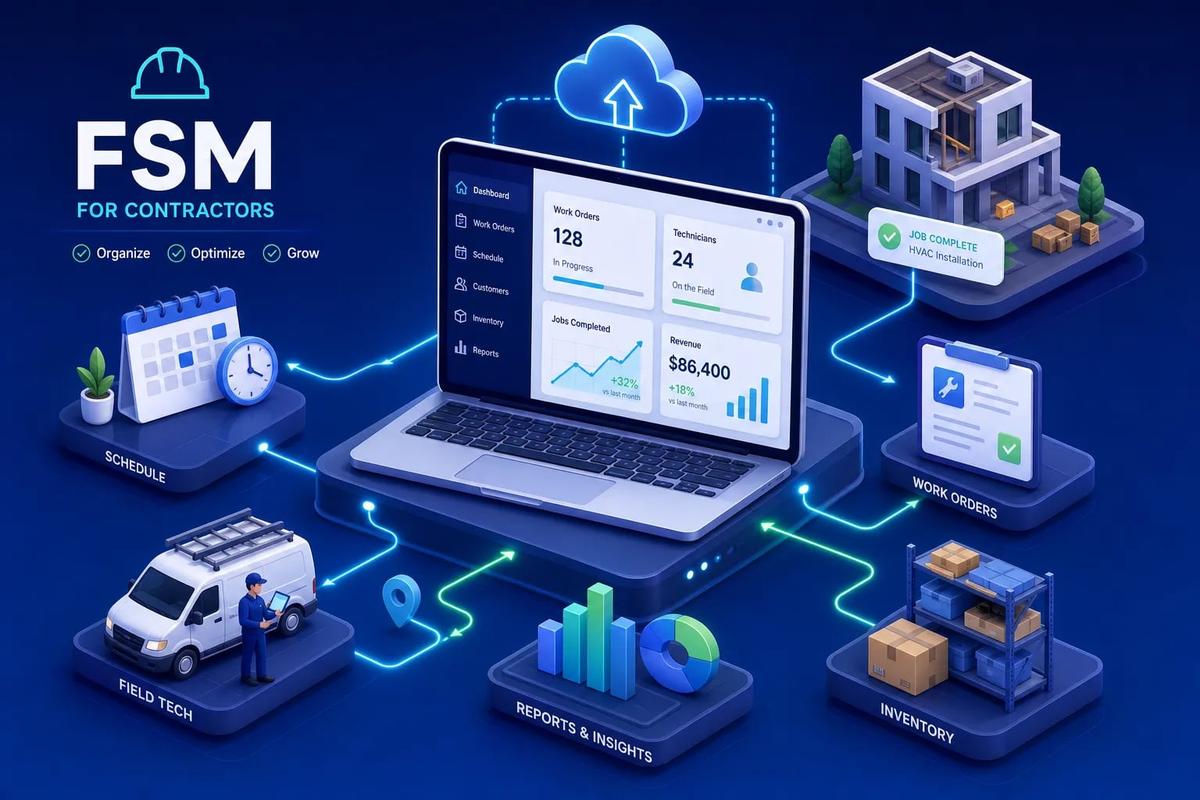
Choosing the top FSM software for contractors in 2026 comes down to one question: does the platform execute the next step, or does it just record what happened? For small residential crews, Jobber and Housecall Pro give you the fastest path from booking to payment. For mid-size and multi-trade operations, ServiceTitan, Simpro, and BuildOps cover the operational depth you need. For contractors who want AI to execute the next workflow step without waiting for a human prompt, URBLD operates in a different category altogether.
What separates a platform worth adopting from one that creates more digital paperwork is automation depth, ease of field adoption, and the real total cost of ownership. Industry patterns consistently show faster invoice collection for teams that reduce human handoffs through automation. Those gains come from fewer manual touchpoints, not from better-looking dashboards.
Below is a ranked look at nine contractor platforms, so you can shortlist two or three and know exactly what to test before you commit.
Key takeaways: top FSM software for contractors
- Automation depth decides ROI: A platform that auto-triggers invoices and accounting sync beats one that digitizes the same manual steps you already have.
- Pricing models diverge sharply: Flat-rate plans work for smaller teams; per-user pricing scales costs faster than most operators expect at demo time.
- Field adoption determines everything: If your technicians don't use the mobile field service app consistently, the software delivers nothing regardless of what it costs.
- Total cost beats the sticker price: Implementation, integrations, add-ons, and onboarding can double or triple year-one cost for enterprise-tier platforms.
- AI execution vs. task tracking: Most platforms log what happened; URBLD executes what comes next without waiting for a human to prompt it.
- Match the platform to your size: Jobber for small teams, ServiceTitan for large residential trades, URBLD when you need the full revenue cycle automated in one system.
What actually separates good FSM software from expensive busywork?
Most scheduling and dispatch is solved by every major platform on this list. The real gap shows up in accounting sync, job costing, and cross-module automation. A contractor evaluating field service software by ticking feature boxes will come away thinking these tools are nearly identical. They're not.
Automation depth is the first distinction that matters. The difference between a tool that fires an invoice automatically when a job is marked complete and one that waits for an office person to check the work order and send it manually isn't a minor UX detail. It's the difference between same-day cash flow and a three-day lag across dozens of jobs per week. A platform built to log what happened is a fundamentally different product from one built to execute what comes next, even when the feature checklist looks the same.
Field adoption is the second. Software that technicians ignore on day two costs you everything. A polished mobile field service app with an intuitive work order flow isn't a nice-to-have; it's the feature that determines whether the rest of the system works at all. If your crew reverts to paper or phone calls, the dispatch board, inventory module, and accounting sync all fail downstream.
Total cost of ownership is the third factor most evaluations underweight. The license fee is the smallest part of the bill. Implementation, onboarding, required add-on modules, GPS tracking, payment processing fees, SMS usage, and the ongoing cost of integrating tools that don't talk natively all add up. The right evaluation question isn't "does it have invoicing?" Every platform has invoicing. The question is: does scheduling connect to dispatch, inventory, invoicing, and accounting without re-entry? If not, you still have a patchwork, just a more expensive one.
How the top 9 field service platforms stack up side by side
Platform comparisons flatten depth into checkmarks. The table below reveals positioning; the sections that follow explain fit. Pay close attention to the automation column. Rule-based automation (triggers you configure) is meaningfully different from AI-executed automation (the platform acts without waiting for a human prompt). Based on vendor product descriptions, only one platform in this list operates in that second mode natively.
Best picks for small and growing residential contractors
1. Jobber: the cleanest path from booking to payment for smaller crews
Jobber is best for small residential service teams, generally up to around 10 technicians, where speed from booking to payment is the priority. Its scheduling is fast, the mobile app is genuinely polished, and the client hub reduces the customer back-and-forth that eats up office time. QuickBooks sync works reliably, which matters when your bookkeeper isn't a software specialist.
2. Housecall Pro: best when growth and marketing matter as much as dispatch
Housecall Pro adds built-in customer follow-up, reviews management, and online booking to solid scheduling and invoicing. For a growing home-service company still managing marketing manually across separate tools, that consolidation has real value. The mobile experience is built for owner-operators and technicians who aren't tech-heavy.
The trade-off is that job costing and purchasing workflows are thinner than what a 15-plus technician operation actually needs. Use it while you're scaling. Plan to move when purchasing, inventory, and detailed profitability tracking become daily requirements.
3. FieldPulse: the balanced option for trades scaling toward mid-market
FieldPulse covers scheduling, CRM, job costing, parts tracking, invoicing, and margin visibility in one interface. That makes it meaningfully more capable than Jobber or Housecall Pro for HVAC, plumbing, and electrical contractors who have outgrown the basics but aren't ready for enterprise depth. The feature set sits in a useful middle ground for field service solutions for contractors at this stage.
Run the math before a 10-person demo, because the number that looks fine at five technicians looks very different at twelve.
Best platforms for mid-size and commercial multi-trade operations
4. ServiceTitan: deep operational control for larger residential trades
ServiceTitan is one of the most comprehensive residential-trade platforms available. Pricebooks, service agreements, memberships, financing, project phases, and advanced dispatch and scheduling are all in one system.
Year-one total cost of ownership for a larger team can climb well into the mid-five- to low-six-figure range depending on modules, services, and headcount. The right fit is HVAC, plumbing, electrical, and roofing companies with 15-plus technicians who need every module and have the internal capacity to implement them.
5. Simpro: the strongest job-costing platform for commercial contractors
Simpro connects estimating, project management, scheduling, inventory, purchase orders, and financial reporting across multi-stage commercial jobs. Progress billing, detailed material costing, and subcontractor coordination make it the clearest choice when commercial job profitability is the primary problem to solve. If you need to know, in real time, whether a 90-day commercial HVAC project is running over on labor, Simpro is built for that.
Plan for a structured implementation timeline; this isn't a tool you configure in a weekend. The payoff is operational financial visibility that most FSM platforms can't match on the commercial side.
6. BuildOps: built for commercial service contractors with complex dispatch needs
BuildOps is designed specifically for commercial HVAC, plumbing, electrical, and multi-trade operations that need enterprise-grade dispatch alongside project documentation and reporting. Where ServiceTitan is strongest in residential trades, BuildOps is the sharper tool when the work is commercial and field documentation, work order control, and profitability reporting across multiple sites are central to daily operations.
Implementation is project-managed and typically runs 4–12 weeks for a mid-size deployment. Confirm what's included in onboarding before signing; custom migrations and premium training can add to the baseline.
What if you want AI to run the workflows, not just record them?
Every platform in this comparison does some version of scheduling, invoicing, and mobile updates. What they share is a common architecture: humans trigger the next step. A job gets completed, a person checks the work order, a person creates the invoice, a person updates accounting. As your volume scales, the human in the middle becomes the bottleneck. Hiring more office staff to manage more software isn't a scalable answer.
7. URBLD: an AI operating system built for field service, not a task tracker
Full disclosure: URBLD is our product. We built it to approach this problem differently. Rather than tracking what your crew did and waiting for a person to act on it, URBLD's AI layer executes the next step automatically inside configurable rules. A lead comes in, gets scored, gets routed. A job gets marked complete, the invoice generates, the accounting syncs. No re-entry, no manual trigger, no integration middleware sitting between the pieces.
URBLD covers the full revenue cycle natively, including CRM and lead management with activity-based scoring and automated follow-ups, AI-powered estimating from photo input, and scheduling and dispatch with crew load balancing and one-click appointment-to-job conversion. It also handles native contracts and e-signatures, automated invoicing triggered on job completion, and real-time accounting sync. The entire system runs on a single cross-module automation engine, no third-party workflow builder to configure, no Zapier sequence to maintain, and no gap where a human handoff used to live.
For a roofing contractor running URBLD, the flow looks like this: a lead comes in from a campaign, gets scored and routed automatically, an estimate gets generated from a photo of the property, the contract goes out for e-signature, the crew gets dispatched with load-balanced scheduling, and the invoice generates the moment the job is marked complete. Each step triggers the next without a human handoff. For contractors who have outgrown the patchwork of separate scheduling, CRM, estimating, e-signature, and accounting tools, URBLD is the consolidation point, not another tool to manage.
What does field service management software actually cost in 2026?
Pricing models divide the market into two camps: flat-rate plans with user caps and per-user pricing that scales with headcount. Flat-rate plans (Jobber, Housecall Pro) work well for smaller teams where the per-tech math stays favorable.
The fees you don't see in the brochure are where the real surprises live. GPS and fleet tracking are often separate modules. Card payment processing typically runs 2.6–2.9% plus a fixed transaction fee, and some vendors add a platform markup on top. Integration modules for QuickBooks, payroll, CRM, and marketing may require a higher plan tier or a paid connector. SMS reminders, telephony, and email volume are frequently metered after a monthly allowance. If the platform requires Zapier or API connectors to talk to your accounting software, factor setup and maintenance into year-one total.
A realistic pricing framework by contractor size looks like this:
- 15–50 technicians: costs vary widely by platform, module selection, and integration needs, get itemized quotes rather than relying on per-seat sticker prices
How do you pick the right platform before you waste a demo?
The wrong way to evaluate field service software is to sit through a vendor demo and ask about features. Every vendor checks every box. Answer these three questions before you talk to a sales rep, then run a real job through the trial to see where the handoffs still live.
Start with your current per-week admin hour cost. If your office staff is spending 20-plus hours on data re-entry, scheduling corrections, and invoicing delays, any platform with real automation pays for itself. If you're at five hours, simpler tools win and you don't need enterprise pricing.
Next, count how many tools you're currently stitching together. If you're running a CRM, a scheduling app, a quoting tool, an e-signature platform, and QuickBooks separately, the real cost is the gap between them: dropped leads, missed invoices, and duplicated data entry. That gap is where your revenue is leaking, and no single-feature upgrade fixes it. Good contractor management software closes those gaps at the system level.
Finally, identify whether your bottleneck is dispatch, cash flow, or lead conversion. The answer changes the platform category you should be evaluating. Dispatch problems point to ServiceTitan or BuildOps. Cash flow problems point to platforms with strong invoicing automation. Lead conversion problems point to URBLD, which covers the full funnel from ad click to signed contract natively.
During any trial, watch for these red flags: the vendor requires third-party integrations for basic functions like accounting sync or e-signatures, automation features require a dedicated admin to build and maintain workflow rules, and pricing shown in the demo doesn't include implementation, onboarding, or module fees. Then test one real job end-to-end, lead intake to invoice to payment. See where you have to touch the keyboard manually. Test the mobile app with a technician who has never seen the software. If the work order flow isn't intuitive within the first few minutes, adoption will be a problem. Ask for a QuickBooks sync demo with real job data, not a canned walkthrough.
The verdict: match the platform to the actual problem
The shortlist stands. Jobber and Housecall Pro for smaller residential crews who need a fast, clean path from booking to payment. ServiceTitan for large residential trade businesses with the operational capacity to implement it fully. Simpro and BuildOps for commercial multi-trade contractors where job costing, progress billing, and profitability across complex projects are the central challenge.
When evaluating the top FSM software for contractors, the right call is matching the platform to your core bottleneck. URBLD fits operations that have outgrown the patchwork and need AI to execute the next workflow step rather than waiting for a person to trigger it. Unlike conventional field service solutions for contractors that add a better UI to the same manual process, URBLD is built as a true AI operating system covering the revenue cycle from the first lead to the final payment, no re-entry, no gaps.
The right platform doesn't just digitize your current process. It removes the handoffs that slow you down and quietly cost you revenue. The next step isn't another comparison table, it's running one real job through a trial and seeing exactly where the work still stops to wait for a human. Run one real job through an URBLD trial and see where the handoffs disappear.
Frequently Asked Questions
How do we decide between a flat-rate plan and per-user pricing for our contractor team?
Choose a flat-rate plan if you run a smaller team where the per-tech math stays favorable, and expect per-user pricing to scale costs quickly as headcount grows. We advise running the numbers for your current size and projected hires because per-user models can surprise you at demo time. If you expect headcount to expand, get itemized quotes rather than relying on sticker rates.
How can we tell quickly whether our technicians will actually adopt a new mobile field app?
Test the mobile app with a technician who's never seen the software and watch whether the work order flow feels intuitive within the first few minutes. We consider a polished, intuitive mobile experience essential because if your crew reverts to paper or calls, dispatch, inventory, and accounting sync all fail downstream. Use a real-job trial to confirm field adoption before you commit.
When should we choose URBLD instead of another FSM platform like Jobber or ServiceTitan?
Choose URBLD when you have outgrown a patchwork of separate tools and need AI to execute the next workflow step automatically rather than waiting for a human trigger. We built URBLD to cover the full revenue cycle natively, CRM, AI estimating from photos, e-signatures, load-balanced dispatch, automated invoicing, and real-time accounting sync, so it removes handoffs rather than just digitizing them. If your primary bottleneck is lead conversion or eliminating human handoffs across the funnel, URBLD is the right fit.
Related articles

How to Replace Multiple Business Tools With One Platform
Replace multiple business tools and stop losing revenue to fragmented software. Learn how to audit, migrate, and consolidate your stack the right way.
Field Service CRM: Features, Pricing, and How to Choose
A field service CRM does far more than a generic CRM. Learn the must-have features, top platforms, pricing models, and how to pick the right one for your team.

Best Contractor Invoicing Software for 2026 (Compared)
Compare the best contractor invoicing software of 2026. See features, pricing, and top picks for job costing, mobile billing, and faster payments.
Field Notes Software: Stop Losing Job-Site Data at Billing
Field notes software captures job-site data — but disconnected tools create silos. Learn what to look for and how an integrated platform fixes it.

Roofing Operating System: The 2026 Contractor's Guide
A roofing operating system connects leads, estimates, crews, and invoices in one platform. Compare top solutions, pricing, and ROI for 2026 and find yours.
Enterprise Business OS Explained: What It Really Is in 2026
Learn what an enterprise business OS actually is, how it differs from ERP and CRM tools, and why field service companies are making the switch in 2026.
Found this useful? Share it with another contractor or service business owner.