All-in-One Contractor Platform: The 2026 Buyer's Guide
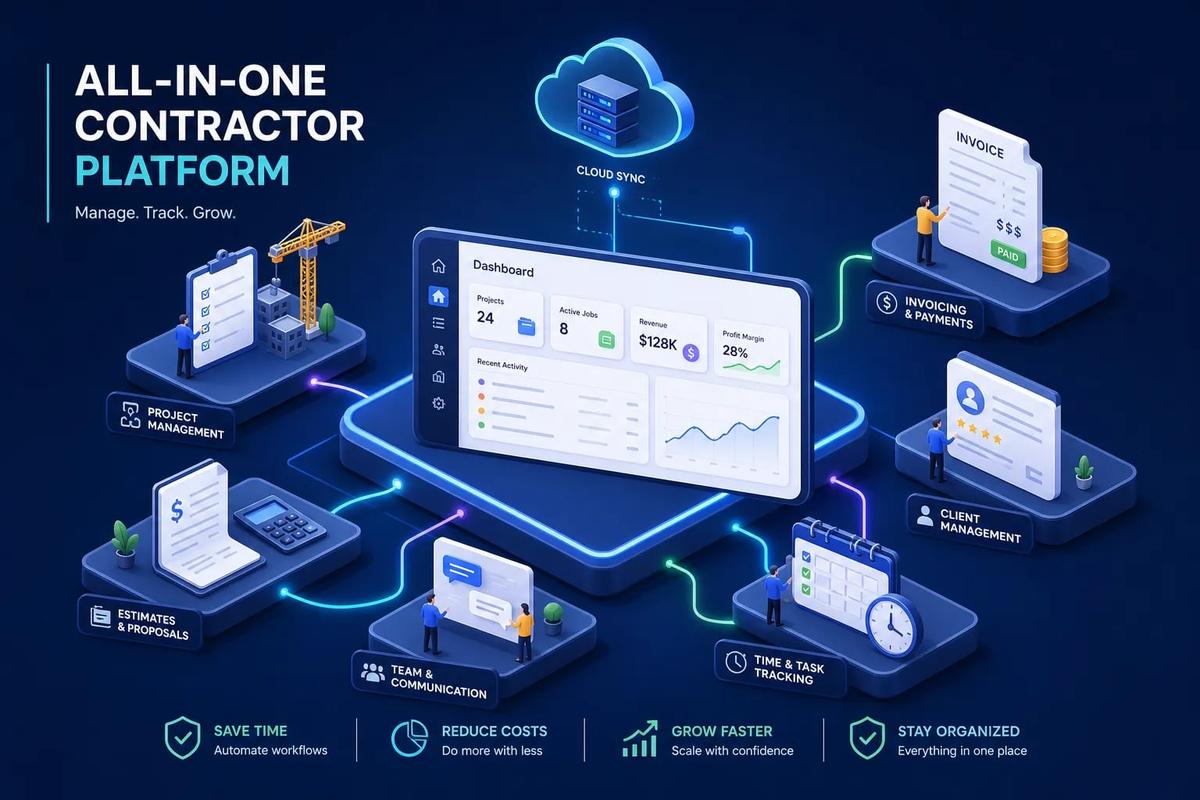
Most contractors aren't running one business, they need an all in one contractor platform that replaces the five apps that have never spoken to each other, held together by spreadsheets, copy-paste habits, and an office manager who has memorized every workaround. The CRM tracks leads. The scheduling tool tracks jobs. The invoicing software sits on its own island. DocuSign handles signatures. QuickBooks handles books. And somewhere between all of that, real work gets dropped.
This isn't sophistication. It's a broken operation that looks like a system. A genuine all-in-one contractor platform doesn't just pack more features into a dashboard; it connects every stage of the business, from the moment a lead comes in to the moment the final payment clears. That connection is where the real value lives, and it's what most "all-in-one" marketing claims quietly skip over.
This guide covers exactly what a connected contractor platform needs to include, how to evaluate vendors without being dazzled by feature demos, what to expect from pricing and implementation, and why platforms like URBLD are worth serious consideration for field service and installation businesses.
Why an all-in-one contractor platform beats the multi-tool stack
The average contractor runs between five and eight different software tools to manage their business. Only about 16% have fully integrated systems, which means the vast majority are spending meaningful time and money keeping disconnected tools from falling apart. This isn't a technology problem, it's an architecture problem.
The typical setup looks like this: a CRM captures leads, a scheduling tool manages appointments, a separate invoicing platform sends bills, DocuSign collects signatures, and spreadsheets hold everything else together. Each tool was adopted because it solved one specific pain. The problem is that none of them were designed to talk to each other, so the data lives in five places and has to be re-entered at every handoff.
Those handoffs are expensive. Field service operations consistently show that contractors lose roughly 8 to 12 hours per week to manual data re-entry and administrative friction between disconnected systems. That's a part-time employee's worth of time, spent doing what software should handle automatically. And the cost isn't just labor. Late invoices, dropped leads, and scheduling errors all trace back to the gaps between tools, not to the tools themselves.
The behavioral pattern that creates this problem is worth understanding. Contractors evaluate software one problem at a time. The scheduling app fixes scheduling. The CRM fixes lead tracking. But nobody evaluates the whole workflow as a system, so twelve months later the stack has grown and so has the chaos. The answer isn't more tools. It's a different kind of thinking about what software is supposed to do.
What a real all-in-one contractor platform actually includes
The phrase "all-in-one" has been diluted by marketing. Many vendors apply it to platforms that offer a long list of modules, half of which are shallow and several of which rely on third-party integrations to actually function. That's not all-in-one. That's a hub with plug-ins, and the distinction matters the moment something breaks or fails to sync.
A real contractor management platform needs to natively cover six core functions: CRM and lead management, scheduling and dispatch, estimating and proposals, contracts and e-signatures, invoicing and payments, and crew and workforce management. Natively is the critical word. If any of these functions require a manual export or a third-party integration to work, the platform isn't complete; it just looks complete until you need it to do something real.
What "connected" looks like in practice is a specific thing. A lead comes in through an ad, gets scored and routed to a sales rep, converts to an appointment, then a job, triggers an estimate, gets signed via e-signature, dispatches a crew, and auto-generates an invoice on job completion. No re-entry at any step. No Zapier holding it together. That's the standard worth holding every vendor to. URBLD was designed to run this workflow natively, from lead intake through invoicing, without gaps or reliance on third-party apps to fill in the missing pieces.
Some vendors will point to 12 or 15 modules as evidence of depth. That's not the right measure. Width without depth is just a longer list of features that don't fully work. What matters is whether each function handles the real complexity of contractor operations, not a simplified version of it dressed up for a demo.
The six core modules every platform must get right
CRM and lead management
A contractor CRM needs to do more than store contact records. It needs to handle inbound lead capture, activity-based lead scoring, automated follow-up sequences, and clean pipeline visibility by source and stage. If it doesn't track where a lead came from and automatically trigger the next follow-up action, it's functioning as an address book, not a sales engine. Many field service businesses lose a significant percentage of their leads not because the leads are bad, but because follow-up is slow and the CRM doesn't connect to the scheduling system.
Scheduling and dispatch
Scheduling isn't a calendar feature; it's a coordination system. It needs to handle crew load balancing, inbound and outbound coordination, and one-click conversion from appointment to job. Many contractor platforms also include GPS tracking for field crews, so the office knows where every technician is without picking up the phone. When scheduling exists as a standalone tool, that real-time visibility disappears and dispatch decisions get made on outdated information.
Estimating, contracts, and invoicing
Estimating, contracts, and invoicing should function as a single continuous flow, not three separate steps. An estimate gets built, sent for approval, converted to a contract, signed electronically, and then triggers an invoice when the job is marked complete. When these three functions live in separate tools, delays and errors compound at every handoff. Native document creation, e-signature, and invoicing in one system eliminate those failure points entirely.
Crew management and time tracking
Crew management and time tracking are often underbuilt in platforms optimized for the sales or billing side of the business. GPS clock-in and clock-out, productivity tracking, and crew assignment visibility allow owners to manage field teams without being on the phone constantly. This function needs to be built into the workflow, not bolted on as an afterthought. When it's connected to scheduling and job completion, it also feeds into job costing automatically, which is where the real margin visibility comes from.
How contractor platform pricing and total cost of ownership actually work
Published subscription pricing is the beginning of the cost conversation, not the end. Platforms like Buildertrend are commonly cited at $339 to $1,099 per month depending on tier and billing cadence. Third-party total cost of ownership estimates for firms with real data migration needs and multi-user rollouts often land in the $15,000 to $30,000 range for year one, with larger teams pushing significantly higher. Procore trends above that for enterprise deployments. These numbers aren't a reason to avoid investing in a platform, they're a reason to go in with clear expectations.
Implementation is where most contractors get surprised. Moving contacts, job history, financial data, and document records from five different tools into one platform is a real project, not a weekend task. Platforms that offer structured onboarding with defined timelines and migration support reach productive use faster. Platforms with light or no onboarding support see low adoption because the team never fully learns the system, and the old tools quietly stay in rotation.
Newer purpose-built contractor software suites tend to offer more competitive pricing than legacy platforms built up over years of layered add-ons. The right question isn't which platform has the lowest monthly rate. It's which platform delivers the deepest native coverage per dollar spent. When a single platform eliminates the need for a separate CRM, scheduling tool, contract tool, and invoicing software, the total cost comparison changes significantly. The subscription line item goes up; the software stack line item disappears. This is where a construction project management software investment starts to pay for itself across the full operation rather than just one department.
The integration trap: when "connects to everything" is a red flag
A platform that needs fifteen integrations to complete a standard workflow is not a platform. It's a coordination problem wearing a dashboard. Every integration is a dependency: a connection that can break, lag, or fail to sync when a vendor updates their API. For a contractor running twenty or thirty jobs a month, one broken sync between scheduling and invoicing means delayed billing, and delayed billing means cash flow problems that have nothing to do with the actual work performed.
There's a meaningful difference between a platform that natively handles a workflow and one that connects to a third-party tool to handle it. The integration might work reliably on a normal day, but it introduces latency, failure points, and data inconsistency that a native system avoids entirely. When evaluating any end-to-end builder platform or contractor software suite, ask this directly: does this function live inside the platform, or does it rely on a connected app? The answer tells you more than any feature comparison grid.
QuickBooks integration is table stakes in the US market, but how the sync works matters as much as whether it exists. A one-way export is not a sync. Bidirectional, real-time sync that reflects job completions, payments received, and expenses updated without manual reconciliation is the standard worth demanding. The same applies to any other accounting platform already in use. If the vendor can't describe exactly how data flows in both directions and what triggers each update, the integration is probably shallower than the sales deck suggests.
What implementation looks like and when you see returns
Implementation timelines vary based on the size of the operation and the volume of data being migrated. Smaller teams running one to three crews typically onboard faster than larger firms with complex data histories. As a general framework: the first two to three weeks cover configuration and data migration; the following weeks involve a parallel run period where the new system is used alongside the old one; full adoption typically follows once the team is comfortable and the old tools are switched off. That said, timelines can range from a few weeks to several months depending on complexity, and contractors should build that variability into their planning.
Good onboarding has clear signals: team members using the system for real jobs within the first two weeks, automated workflows triggering correctly, and the office team no longer manually entering data from one tool into another. Poor onboarding also has clear signals: the platform is running, but only for invoicing while everything else is still in the old tools. That partial adoption pattern is the most common reason contractors don't get the ROI they expected from a platform change. The system works; the team just never fully migrated.
Faster invoicing is usually the first measurable result, because billing connected to job completion eliminates the lag between work finished and invoice sent. Industry data from field service operations indicates that billing triggered natively by job completion, rather than entered manually after the fact, can meaningfully reduce invoice processing time. Lead conversion improvements follow as the CRM and follow-up automation mature. Full margin visibility through integrated job costing tends to take 90 to 120 days of clean data before the numbers are reliable enough to make pricing decisions from.
The ROI numbers worth paying attention to
Administrative time savings are the most immediately tangible result of platform consolidation. Contractors moving from fragmented stacks to connected platforms consistently report recovering eight to twelve hours per week in labor that was previously spent on manual data re-entry, follow-up reminders, and chasing invoice status. For a small operation, that's capacity that can go back into field work. For a larger one, it's often the equivalent of a part-time office role that never needed to be hired.
Lead and revenue metrics shift meaningfully when the CRM, scheduling, and follow-up automation work as a single system. Contractors lose a real percentage of inbound leads simply because follow-up is slow or inconsistent between a standalone CRM and a separate calendar. Automated lead routing and follow-up sequences built into the platform address that without adding headcount. Faster lead response is one of the highest-return improvements a service business can make, and it's a byproduct of having the system connected rather than a feature someone has to configure separately.
Some vendor-reported case studies show contractors who switch to a fully connected field-to-office construction platform with native job costing achieving 15 to 20% improvement in project profit margins in the first year, not because they raised prices, but because they finally had accurate, real-time data on what each job actually cost. When estimating, job costing, and invoicing live in the same system, owners can see actual margin per job rather than guessing from QuickBooks exports weeks after the work is done. That visibility changes pricing decisions, crew assignments, and which job types get prioritized going forward. The payback period for platform consolidation commonly lands in the four to twelve month range, with some contractor workflow automations breaking even in as little as three to four months.
How to trial an all-in-one contractor platform in 3 weeks
Before scheduling any demos, answer three questions clearly. First, which functions do you need natively, not via integration? Second, how many users will need access and at what permission levels? Third, does the platform need to support a single location or multiple? Those three answers alone will eliminate most of the market and make evaluation faster. You don't need to demo ten platforms. You need to demo the right three.
When you do get to a demo, run one specific test: ask the vendor to show you a complete workflow from lead to paid invoice without switching screens or mentioning an integration. That single test reveals more about the platform than any feature comparison grid or sales deck. Platforms that can demonstrate CRM to scheduling to estimate to contract to job to invoice in one connected flow are worth shortlisting. Platforms that switch screens, mention third-party tools, or quietly skip steps are not truly all-in-one, regardless of what the marketing says.
Use the following quick checklist when evaluating any all in one contractor platform:
- Native CRM with lead scoring and automated follow-up
- Scheduling and dispatch with one-click job conversion
- Estimating that converts directly to contract and e-signature
- Invoicing triggered automatically by job completion
- Crew management with GPS time tracking tied to job costing
- Bidirectional QuickBooks sync (not a one-way export)
- No integrations required for any core workflow step
For field service and installation contractors specifically, URBLD belongs on that shortlist. It was built for high-throughput service businesses that have outgrown patchwork stacks, and it covers every stage from ad click to payment, from lead intake through scheduling, estimating, contracts, crew dispatch, and automated invoicing, without manual re-entry between steps. Alongside URBLD, include one platform your peers in the same trade already use and one your accounting team has already worked with. Trial all three with real jobs over two to three weeks. Real usage under real conditions reveals more than any demo, and it's the only honest way to know which system your team will actually adopt.
The bottom line
A real all-in-one contractor platform isn't about having more features. It's about having fewer handoffs, less re-entry, and a single system that runs the business from first contact to final payment. The right platform makes the whole operation faster, leaner, and more profitable without requiring a full-time integrations manager to keep everything working.
Build your shortlist based on native coverage, not feature count. Ask vendors to demonstrate the full workflow in a single connected flow. Trial with real jobs and real conditions. The platform worth choosing is the one your team actually uses, the one that handles the administrative work instead of them.
When your invoices go out the moment a job is marked complete, your leads get followed up without anyone picking up the phone, and your job margin shows up in real time instead of three weeks later in a QuickBooks export, you'll know you made the right call. That's what a connected construction ERP for contractors actually feels like. Reach out to the URBLD team to see the full workflow in a live demo and find out whether it fits your operation.
Found this useful? Share it with another contractor or service business owner.