How AI Appointment Booking Works for Field Service Teams
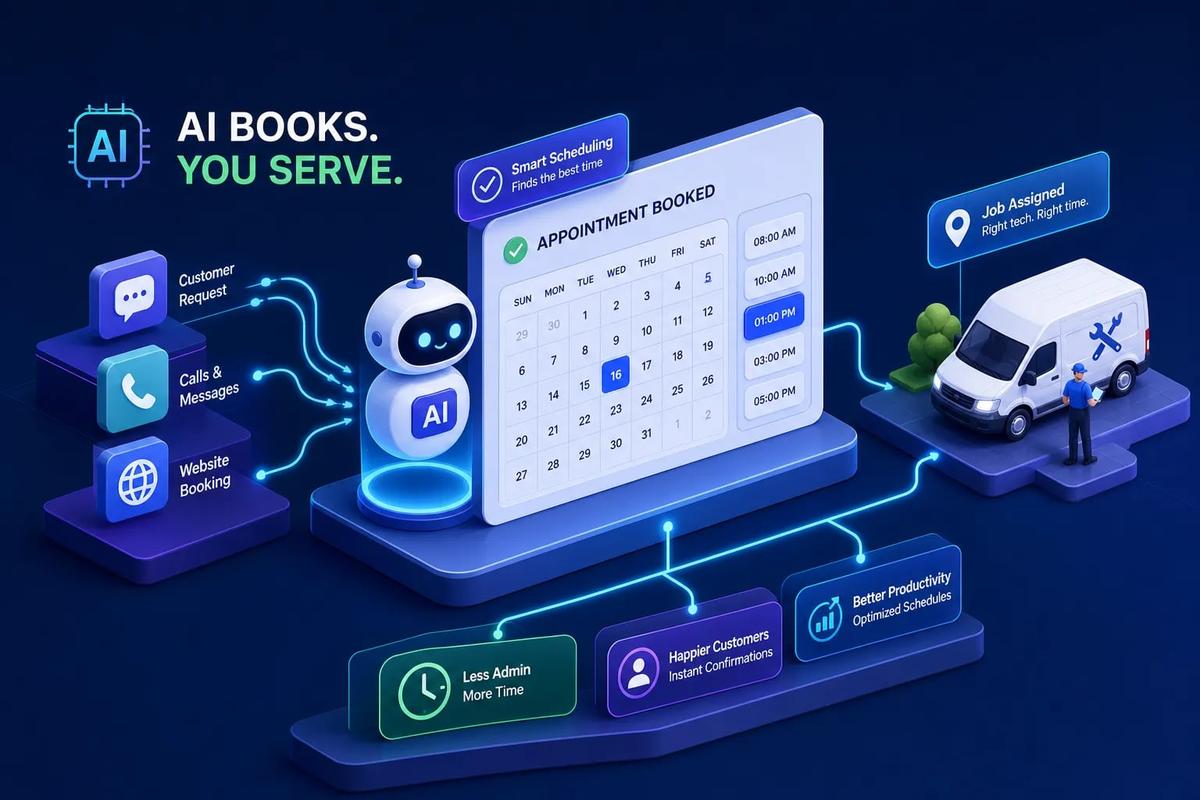
Picture a dispatcher with a phone wedged between their ear and shoulder, scrolling through a spreadsheet while a customer waits on hold. They're checking who's free Thursday morning, whether that tech covers the north side of town, and if the job duration fits before the next appointment. That gap, the time between "a lead comes in" and "a crew gets scheduled", is where field service businesses bleed time, revenue, and customer confidence every single day. AI appointment booking eliminates that manual scheduling gap, but only when it's built to understand crews, job types, travel time, and operational context.
A booking link is not an AI scheduling assistant. A conversational agent that qualifies the job, matches the crew, confirms the time, and writes back to your system is something else entirely.
This article explains how that technology actually works, where it creates real operational value for field service businesses, and why the platform it lives inside matters far more than the booking feature itself. Booking isn't a feature you bolt on. It's a workflow you build around.
What AI appointment booking actually does (and what it doesn't)
The most common misconception is that AI appointment booking is just a smarter version of a scheduling link. It isn't. A scheduling link shows your open slots and lets someone pick one. An AI appointment setter is an agent, running across voice, chat, or SMS, that captures a customer's request, qualifies the job type, checks real-time crew availability, and confirms the booking without a human in the loop at any step.
Here's a concrete example: a homeowner submits a roofing inquiry at 11 PM after seeing storm damage. A scheduling link does nothing until business hours. An AI booking agent picks up the inquiry immediately, asks a few qualification questions, checks which crews are available for a next-day assessment, confirms the appointment, and sends a confirmation text. The owner wakes up to a booked job, not an unread form submission.
The two layers every AI booking system needs
Every functional AI scheduling system has two distinct layers working in parallel. The first is the conversational layer, the voice or chat agent that talks to your customer, asks the right intake questions, and communicates availability. The second is the scheduling logic layer, the engine that reads crew calendars, checks job types, weighs geography, and determines what slots are actually viable.
Both layers must work together. A conversational agent without real scheduling logic is just a chatbot that collects information and hands it to a dispatcher. A scheduling engine without a conversational layer still requires a human to broker the exchange.
Why "book a meeting" logic doesn't translate to field service
Standard booking bots assume any open slot is an interchangeable slot. Field service jobs don't work that way. An AC emergency needs a certified HVAC tech, not whoever happens to be free. A roofing assessment in a far zip code needs a crew with enough drive time buffered before their next job. A booking system that ignores crew skills, job duration estimates, geographic proximity, and equipment requirements doesn't automate scheduling for trades businesses. It creates a to-do list for a dispatcher to verify.
What information the AI needs before it can confirm anything
For an AI booking agent to confirm an appointment instantly and accurately, it needs access to several data inputs: customer location, job type, urgency level, customer history, and live crew availability. When the system has all of this natively, confirmation is instantaneous and accurate. When it doesn't, the "booking" creates a pending item that still requires a human to validate. That's not automation. That's a fancier intake form.
How real-time availability works when crews are in the field
Crews aren't sitting at desks with visible calendars. They're mid-job on a roof, driving between sites, or wrapping up an install at 4 PM when an urgent callback comes in. Real-time availability doesn't mean a static grid that gets updated once in the morning. It means the system reads live crew schedules, current job progress, estimated completion times, and geographic position to determine who can actually take the next appointment.
Connected scheduling systems handle this through calendar APIs and webhook-driven updates. When real-time telemetry and calendar integrations are in place, a crew member's job status change triggers an automatic availability update, no manual input, no dispatcher having to call the tech to ask where they are. In practice, the reliability of these updates depends on device connectivity and how consistently field staff interact with the system.
Reading crew schedules without manual lookups
Modern AI scheduling tools connect directly to crew calendars, whether that's Google Calendar, Microsoft Outlook, or a native FSM schedule, using real-time API access. The system reads free and busy status live, not from a snapshot. When a job runs long, that crew member's next available window shifts automatically, and the booking agent stops offering slots that are no longer viable.
Handling same-day bookings and emergency slots
Field service businesses get urgent requests constantly. An AI booking agent handles dynamic availability by checking which crews are geographically close, which have short jobs finishing soon, and which have cancellation gaps in their schedule. It slots the urgent job into the nearest viable window without dispatcher intervention. For an HVAC business in the middle of summer, this kind of same-day automated scheduling can recover emergency jobs worth several times the monthly platform cost.
What happens when no slots are available
A well-designed automated appointment booking system doesn't just say "we're booked." It offers the next available window, collects the customer's time preference, and can trigger an outbound message when a cancellation opens a slot. This closes the lead capture loop even when the calendar is full, which means you're not losing potential jobs just because a customer called on a busy week.
Crew matching: how AI assigns the right technician to the right job
Booking a time slot is the easy part. Booking the right crew member for a specific job type, in a specific service area, with the right skills and tools available, that's where field service AI scheduling gets genuinely sophisticated. Skill-based routing and geographic load balancing are what separate a useful automated scheduling tool from one that causes more problems than it solves.
Job type and skill-based routing
When a customer describes their job during the intake conversation, the AI maps that job type to crew qualifications in the background. An HVAC business doesn't want a general technician showing up to an AC refrigerant issue that requires EPA certification. The intake questions, service type, and crew skill profiles work together to filter availability before a slot is ever offered to the customer. The booking is already qualified before it's confirmed.
Geographic and workload load balancing
Beyond skill matching, the scheduling logic layer handles territory management and crew utilization. It routes jobs to the nearest available qualified crew and prevents the common scenario where one technician has five jobs stacked while another has one. Balanced crew utilization reduces overtime costs and can reduce factors that contribute to technician burnout, while also cutting drive time between jobs. Both outcomes affect your bottom line directly.
Preventing double-booking and scheduling conflicts
Bidirectional calendar sync and real-time write-backs significantly reduce the double-booking problem that plagues manual scheduling. When an AI booking agent confirms an appointment and assigns a crew member, that slot is immediately blocked across every connected system. Sync latency varies by integration quality and API configuration, so testing this during your pilot is worth the time, but for most well-implemented setups, the gap between confirmation and calendar lock is negligible. No second dispatcher accidentally offering the same slot to a different customer ten minutes later.
Confirmation workflows that close the loop automatically
Getting the appointment booked is step one. Getting the customer to be home, giving the crew accurate job details before they arrive, and handling last-minute changes without a dispatcher involved, that's the confirmation workflow. Field service operators using automated multi-touch confirmation sequences report no-show rates dropping significantly, with some case studies showing reductions from roughly 23% to under 10%. For field service, a no-show means a crew trip that cost you fuel, labor, and an open revenue slot. The financial impact is immediate and concrete.
Automated reminders and their effect on no-shows
Industry benchmarks suggest HVAC and home service businesses typically see no-show rates between 12% and 16% without a structured confirmation system. Roofing estimate appointments tend to run higher, sometimes reaching 25, 35%. Businesses using structured three-touch reminder sequences, booking confirmation via SMS, a 24-hour reminder, and a day-of arrival window message, typically report reductions in no-show rates of 30, 50% across field service categories. For a business running 80 jobs a month at a 15% no-show rate, cutting that to 8% translates directly to recovered revenue with zero additional sales effort.
Two-way SMS and rescheduling handling
A smart confirmation workflow listens as well as sends. If a customer replies to a reminder asking to move their appointment to Thursday, the AI booking agent catches that message, checks crew availability for Thursday, and confirms the reschedule, all without looping in a dispatcher. Two-way SMS turns confirmation into a live conversation, and it handles the most common source of dispatcher interruptions: customers who need to move their appointment.
Keeping the crew informed automatically
Confirmation isn't only for customers. When a booking is finalized, the assigned technician should receive the job details automatically: customer name, service address, arrival window, job type, and any intake notes the customer provided. Crews that arrive informed do better work and create better customer experiences. This push happens the moment the booking is confirmed, not when a dispatcher gets around to it.
Where standalone booking bots fall short for field service
Most AI booking tools solve one problem well: getting the appointment on the calendar. For field service businesses, the appointment is the beginning of a workflow, not the end of one. This is the gap that matters, and it's where bolt-on booking features consistently fail the businesses that deploy them.
The integration problem: booking without context
When a booking bot lives outside your FSM or CRM, every confirmed booking creates data that has to be manually moved downstream. Someone still has to read the booking notification, assign a crew, create a job record, pull the customer history, and generate an estimate. The automation moved the manual work one step downstream. It didn't eliminate it.
What happens after the appointment is booked
Walk through what a field service job actually requires after a booking is confirmed: job record creation, estimate generation, contract delivery, crew assignment with skill verification, parts pulled from inventory, and invoicing triggered on job completion. A standalone booking tool handles exactly one of those steps. The rest still requires manual coordination across the other tools in your stack, which means the dispatcher is still doing dispatcher work, just starting from a different queue.
Why disconnected tools create more admin overhead
The pattern is familiar to any growing field service business: a booking bot feeds into a CRM that syncs (sometimes) with a scheduling app, which triggers a manual handoff to billing. Each tool requires its own credentials, its own maintenance, and its own troubleshooting. The AI booking feature becomes one more thing to manage rather than a system that actually reduces workload. Businesses that have assembled this kind of stack often find themselves with more administrative complexity after the "automation" than before it.
How URBLD builds AI booking into a fully autonomous execution engine
URBLD's AI appointment booking is designed to work differently than a standalone tool because the booking isn't where the automation ends; it's where a chain of autonomous execution begins. When a lead is qualified, an appointment booked, and a crew matched, URBLD is built to generate the job record, trigger estimate creation, dispatch the crew, and prepare the contract for e-signature, all before a human has touched the file.
This is the difference between a booking feature and a booking workflow. The AI is designed to act inside the operational loop at every step, not just at the moment a customer picks a time slot. Verify the specific capabilities that matter most to your operation during a demo or pilot.
From appointment confirmed to job executing: what URBLD automates
Here's the workflow chain URBLD is built to run when a lead comes in. The AI qualifies the inquiry through an intake conversation. It checks crew availability, skills, and geography to match the right technician. The appointment is confirmed and the job record is created automatically in the same system.
If the customer submitted photos, URBLD's AI estimating layer is designed to generate a structured estimate from that input. A contract is then prepared and sent for e-signature. The intent of the platform is that all of this happens before anyone in the office has manually touched the file, shifting the dispatcher's role from data entry to exception handling. Ask the URBLD team for a live walkthrough of this workflow so you can see exactly how each step executes in your environment.
Crew scheduling and dispatch as part of one system, not an add-on
URBLD's scheduling module isn't integrated with a booking bot, it is the booking system. Crew availability, skill-based routing, and load balancing operate inside the same data environment as lead management, estimating, and invoicing. Because customer data, job data, and crew data are designed to live in one unified architecture, the AI has the full context it needs to make accurate booking decisions without waiting on external sync. That's a meaningful structural difference from stacks built on stitched-together integrations.
Why the AI acts inside the workflow rather than sitting beside it
Much of the "AI" in FSM software today functions as a suggestion layer, it recommends the next step, and then a human confirms it. URBLD is built to execute within owner-configured rules: qualifying leads, booking crews, generating invoices, and drafting purchase orders autonomously. The booking confirmation isn't a notification to a dispatcher to go do something. It's designed to be a trigger in a fully automated execution chain that moves the job forward without waiting for a human to click approve. Confirm the specific workflow behaviors with the URBLD team before deployment to make sure your rules are configured correctly.
What to look for when evaluating AI booking for your field service business
The practical question is how to evaluate options against your specific operational needs. The right framework isn't a generic software checklist. It's built around the realities of field service: inbound volume, crew complexity, and what happens after someone books.
Channel coverage: voice, chat, and SMS
Field service customers call, text, and fill out web forms. An AI appointment booking system that only handles chat misses a significant portion of how your customers actually reach you. Look for platforms that cover inbound voice calls with a voice AI booking agent, SMS-based confirmation and rescheduling flows, and web chat capture, all feeding into the same scheduling backend. When all three channels run through one system, you get consistent booking logic regardless of how a lead arrives.
Native workflow execution vs. integration-dependent automation
The critical evaluation question isn't "does it integrate with my CRM?", it's "does it eliminate the handoff entirely?" Ask whether a confirmed booking automatically creates a job record. Ask whether crew assignment happens without dispatcher input. Ask whether the booking connects to invoicing downstream. The more steps the platform owns natively, the less your team has to do manually. Every integration point between tools is a potential failure point and a guaranteed source of manual reconciliation work.
Pricing models and what to expect at each tier
Entry-tier scheduling tools typically run $0 to $20 per month and handle basic booking links with calendar sync. Mid-tier AI scheduling assistants in the $25 to $100 per month range add SMS and voice booking with CRM connection. Advanced platforms at $100 to $500 or more per month include phone agents, autonomous workflow execution, and multi-location support. Frame the ROI calculation honestly: a missed after-hours call that would have booked a $3,000 roofing job costs more than a month of platform fees. The cost of inaction is rarely priced into the comparison.
How to pilot AI appointment booking without disrupting your operations
The most common concern field service owners raise about AI booking is disruption: what if the AI books the wrong crew? What if customers find the experience confusing? What if something breaks mid-booking and a job falls through? These are fair concerns, and the answer to all of them is the same: start narrow, measure clearly, and expand once you trust the system.
Start with inbound: let AI handle new leads first
The lowest-risk entry point is inbound booking for new leads, not existing customer callbacks. New leads have no prior relationship with your business, which means a smooth AI-booked experience is a feature, not a risk. Before going live, configure your intake questions to capture job type, location, and urgency. Connect your crew calendars. Set booking rules around minimum notice, job duration buffers, and service area boundaries. Test with real scenarios before routing live traffic.
Measure the right metrics in the first 30 days
Track four numbers in your first month: speed-to-booking (how quickly a lead converts to a confirmed appointment), no-show rate before and after, dispatcher hours spent on scheduling tasks, and calls answered after business hours. These metrics tell you whether the system is working before you expand its scope. If speed-to-booking drops from hours to minutes and dispatcher scheduling time falls by 30% or more, you have a clear ROI signal to justify broader deployment.
When to expand AI booking to outbound follow-up
Once inbound booking is stable and your team trusts the system, the next step is using AI for outbound execution: following up on estimates that haven't converted, rescheduling jobs that fell off the calendar, or proactively filling open crew slots before the week starts. This is where the booking capability connects back to the broader operational loop. A platform like URBLD is built to run this outbound execution automatically, using the same crew and job data that powers inbound booking, so expanding into outbound doesn't require a new configuration. It's the same system doing more of what it was already built to do.
AI appointment booking: making it work for your business long-term
AI appointment booking for field service isn't a calendar plugin. It's a workflow trigger. When it's connected to crew scheduling, job execution, estimating, and invoicing inside a single system, it removes the administrative layer that slows growing field service businesses down. When it's bolted on from outside, it moves manual work rather than eliminating it.
The businesses that get the most out of AI scheduling aren't the ones with the most sophisticated booking bot. They're the ones where booking confirmation is the beginning of an automated workflow that carries the job all the way through completion. That's the architecture that actually changes how a field service business operates at scale.
URBLD is built on that premise: the AI should execute the workflow, not just assist with one step of it. If the gap between "a call comes in" and "a crew shows up" at your business still runs through a dispatcher, a spreadsheet, or a phone tag chain, reach out to the URBLD team and walk through how the execution engine works in practice.
Explore the URBLD platform
AI Receptionist
Feature pages
AI Follow-Up
Feature pages
AI Follow-Up
Glossary
Jarvis AI
Glossary
FieldPulse Alternatives for Growing Service Teams
Comparisons
How to Automate Field Service Billing
Solutions
How to Reduce Lead Loss in Service Businesses
Solutions
ServiceTitan Alternatives for Growing Service Businesses
Comparisons
Found this useful? Share it with another contractor or service business owner.