Stop Using Zapier for Field Service: Here's What Works
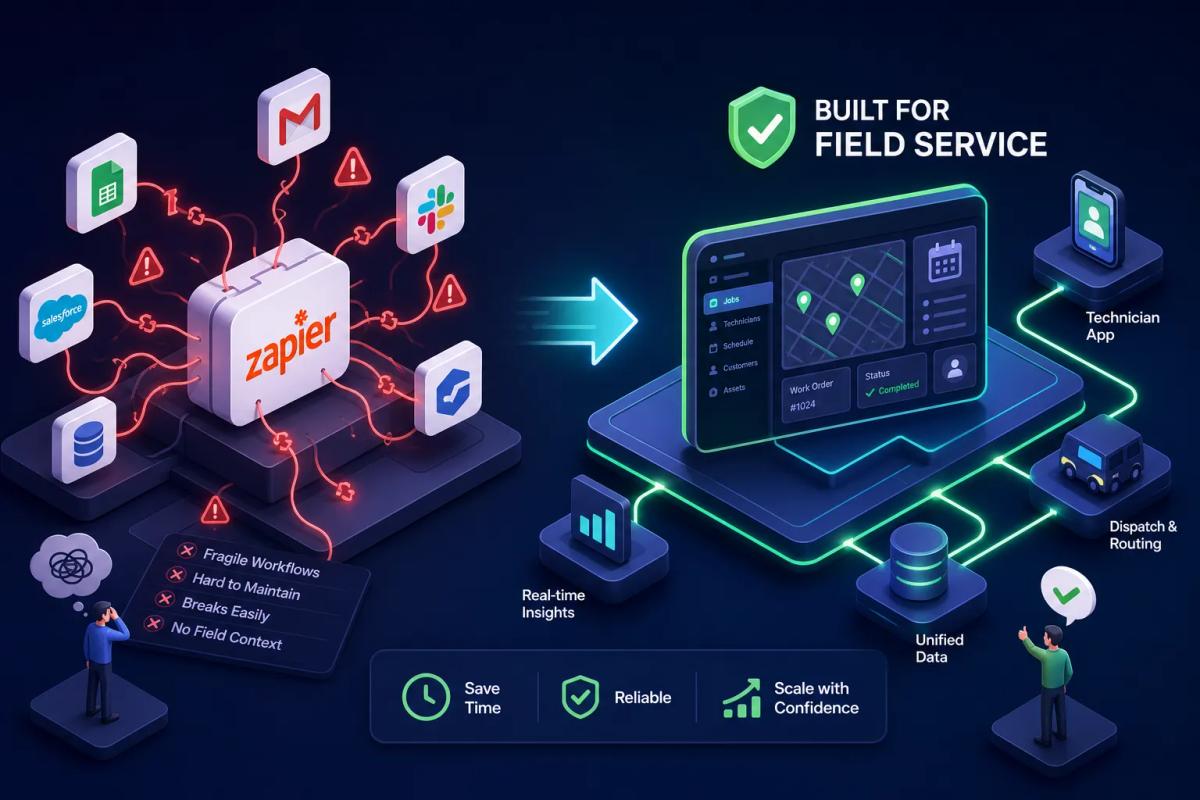
If you're ready to stop using Zapier for field service, you're not alone, and the timing usually isn't arbitrary. Field service businesses land on Zapier because it looks like the fastest way to connect Jobber, QuickBooks, and DocuSign into something that resembles a real system. For a while, it holds. Then job volume climbs, zap chains multiply, and what looked like automation starts behaving like a house of cards. This article breaks down exactly where and why Zapier fails field service operations at scale, and what a genuine replacement looks like. Some businesses have already made this shift, not by swapping one middleware tool for another, but by moving to a single connected execution engine that makes Zapier largely irrelevant.
The goal here isn't to tell you that Zapier is a bad product. It isn't. The problem is architectural: Zapier was built as middleware, and field service operations need something built from the ground up to run as one system. Those are fundamentally different things, and the gap between them becomes expensive once your business scales past a handful of jobs per day.
Why Zapier became the default glue in field service stacks
The appeal is straightforward. Zapier offers thousands of app connectors, a visual workflow builder, and pricing that feels manageable when you're just starting to connect tools. For a service business owner trying to stitch together a CRM, a scheduling platform, and an accounting system without hiring a developer, it looks like the obvious answer. No engineering resources required, no custom API work, no long implementation timeline.
In the early stages, it genuinely works. At low volume, say, a few dozen jobs a month, simple two-step zaps handle the load without friction. Polling delays and rate limits are invisible problems at low trigger frequency. The system appears to work, so you keep building on top of it: another zap for customer SMS, another for invoice generation, another for crew status sync. The stack grows in layers, each one making sense in isolation. The problems only surface when volume does.
How to Stop Using Zapier for Field Service: Where the Model Breaks Down
Rate limits and execution delays during burst dispatch windows
Zapier throttles when triggers arrive in bursts, and bursts are exactly what field service dispatch looks like. To illustrate the scale: in a busy morning window, a mid-size crew operation might push through 15 assignments, 30 status updates, and a dozen customer notifications in under 10 minutes. Instant-trigger zaps hit 429 errors above 20,000 requests per 5-minute window. Polling zaps on standard plans run on a delay, according to Zapier's own documentation, standard polling intervals can introduce meaningful lag between a trigger event and its action firing. That lag is invisible in a single-job scenario and operationally damaging when it compounds across an entire dispatch day.
Conditional logic that can't handle real-world job routing
Zapier Paths max out at five branches, with no nesting and no loop support. Field service routing decisions typically depend on multiple simultaneous variables: job type, SLA tier, region, technician skill set, current crew load, and escalation status, often six or more at once. When Zapier can't model that logic cleanly, operators either build unsafe workarounds or the automation routes incorrectly without flagging the error. An incorrect dispatch that fails silently is worse than one that fails visibly, because the former looks successful until a technician shows up at the wrong site or an SLA window closes.
Sync failures and the silent data gaps they create
When a zap fails mid-chain, Zapier holds the run rather than immediately surfacing the error. A job can complete in the field, the crew check-out can trigger successfully, and the invoicing step can silently hold for hours. The operator doesn't know. The customer doesn't get an invoice. The accounting sync never fires. These held runs are the most operationally damaging failure mode in field service Zapier setups, because they look like success right up until someone manually audits the output.
The hidden cost of maintaining multi-step zap chains
What field service teams actually spend per task at volume
Zapier's task-based pricing compounds fast in multi-step workflows. A five-step workflow covering dispatch confirmation, CRM update, customer SMS, job status sync, and invoice trigger consumes five tasks per job run. At 500 jobs a month, that's 2,500 tasks per workflow chain before accounting for retries or error-handling steps. At that volume, teams move into higher Zapier tiers at $103.50 per month or more, while also paying separately for Jobber, QuickBooks, DocuSign, and every other connected app. A realistic SMB field service stack often lands at $100 to $300 per month in software costs before any operational overhead is counted.
The operational drain of debugging broken automations
Beyond the subscription cost sits the maintenance burden. Someone on the team owns the zaps. When a workflow breaks because an app updated its API schema, a field mapping drifted, or a rate limit was silently hit, that person has to trace the failure through Zap History, identify which step broke, rebuild the mapping, and test it while live jobs keep running. Teams commonly report three to five hours of monthly maintenance on a modest stack, scaling to 10 to 15 hours for larger operations. That diagnostic work consistently pulls an operations manager or business owner away from revenue-generating activity every time it happens.
Data gaps that damage operations exactly when it matters
When a job completes but the invoice never fires
Consider the sequence: a technician marks a job complete in the field scheduling tool. The zap that should trigger a QuickBooks invoice hits a held-run state because the account exceeded its polling rate. The invoice doesn't generate. The business owner doesn't notice until following up on outstanding payments three days later. This isn't a theoretical failure mode. It's the kind of sequence that erodes cash flow one delayed invoice at a time, and it's particularly insidious because the trigger event (job completion) registered as successful. The failure sits one step downstream, invisible without a manual audit.
How field mapping limits create compounding data quality problems
Zapier caps individual action steps at 1,000 fields, with a 30-second timeout for field retrieval and a 20 MB limit on HTTP response payloads. Field service records involving multi-location inventory, staged payments, permit data, and crew time logs can push into these limits. When they do, fields drop silently. Data arrives incomplete in QuickBooks or DocuSign, and the downstream record becomes unreliable without anyone being immediately aware. A QuickBooks invoice missing a line item because a payload timed out looks like a clean record until someone cross-references it against the original job.
What a real alternative to Zapier actually looks like
The difference between stitched tools and a connected execution engine
Zapier is middleware: it sits between tools that were built independently and passes data between them. Every sync is a handoff across a gap, and every handoff is a failure surface. A different architectural approach eliminates the gap entirely by running all workflows inside a single data model. When the job record, the invoice, the crew assignment, and the customer account all live in the same system, there is no sync to fail and no zap to maintain. The failure modes that dominate Zapier-based stacks disappear, not because they were solved, but because the architecture that created them no longer exists.
What native automation inside a single platform actually does
In a connected system, completing a job doesn't trigger an external integration. It updates a record that the invoicing engine, the accounting sync, and the customer notification layer all read from directly. Rules fire immediately, not after a polling interval. Conditional logic operates on the full data context of the job, not on a flattened webhook payload. The execution is deterministic: if the rule says invoice on job completion, the invoice generates on job completion. That reliability isn't a feature of better middleware. It's the result of removing middleware from the equation entirely.
How URBLD runs field service without Zapier or integrations
A single execution graph from lead intake to payment
URBLD is designed as a complete business operating system for field service: not a CRM with add-ons, not an FSM tool with a billing module, and not a platform that relies on Zapier to connect its own features. According to URBLD's architecture, the entire revenue cycle runs inside one connected system. A lead captured from an ad gets scored by the AI layer and routed to a workstation. It's booked, dispatched, and executed in the field, then invoiced on job completion. The accounting sync follows automatically, with no external integration or manual data re-entry required. The workflow rules run on the same data model the crew, the dispatcher, and the owner all read from in real time.
That architecture is designed to directly address the problems that break Zapier-based stacks. Because nothing is polling an external service, there are no polling intervals introducing lag. Because data doesn't cross an API boundary, there are no field mapping caps to hit. When the job record and the invoice live in the same system, a completion event triggers an immediate write, not a trigger waiting to be processed by a separate application.
AI execution that replaces the human triggers Zapier depends on
Where Zapier requires a human to configure a trigger and hope it fires correctly, URBLD's AI layer is built to act directly inside workflows. Leads get qualified autonomously. Crews get routed based on load and location. Invoices generate on configurable completion rules. Purchase orders draft when inventory drops below threshold. These aren't zap chains, they're native execution steps running on a single connected graph. The cross-module automation engine uses triggers, conditional rules, and AI execution to replace manual handoffs. For businesses that have outgrown a patchwork software stack, this kind of integrated approach is the operational shift that actually scales, because the system grows with the operation rather than fragmenting under it.
Zapier alternatives for field service: where they honestly fit
When Make or n8n makes sense as a field service automation alternative
If a business needs lower-cost middleware and has technical resources to manage it, Make and n8n are legitimate field service automation alternatives worth evaluating. Make charges per operation rather than per task, which reduces cost at moderate field service volumes. At 500 jobs per month with a five-action workflow, Make's per-operation pricing keeps monthly automation costs materially lower than Zapier's task tiers. n8n, when self-hosted, brings the per-run cost close to infrastructure cost alone, often around $10 to $15 per month in server overhead.
Neither option eliminates the underlying architectural problem. Workflows still bridge gaps between separate tools, and every bridge is still a failure surface. But they reduce the financial pain of staying on a stitched-together stack while a business evaluates a more complete migration. Think of them as viable iPaaS alternatives for field service situations where a full platform switch isn't yet feasible.
When native FSM automations are enough
Platforms like Jobber, Workiz, and Housecall Pro include built-in automation for scheduling confirmations, customer reminders, and basic invoice triggers. For businesses running simple, low-volume workflows, these native FSM automations may be sufficient without any middleware at all. The ceiling appears when workflows cross module boundaries: when a job completion needs to update an accounting record, trigger a contract, and alert the dispatcher simultaneously. At that point, native automations hit their limits and middleware re-enters the picture. Moving to a platform built to handle all of it internally is one way some businesses avoid that ceiling permanently, though the right fit depends on the complexity and scale of the operation.
Migrating Off Zapier for Field Service: A Practical Playbook
Migration risk is real but manageable with a disciplined process. Adding one caution upfront: the most common mistake is cutting over before the new system has been validated against real-world edge cases. The core principle remains build before you cut, run both systems in parallel before committing, and validate thoroughly before you decommission anything. Rushing any of those phases is where data loss actually occurs.
Audit and document every active zap before touching anything
Before disabling a single workflow, inventory every zap: trigger, actions, filters, paths, custom code steps, field mappings, and connected apps. Zapier allows account owners to export Zap workflows as JSON by navigating to Settings → Security and data → Download my Zap workflows. That export is your source-of-truth blueprint. Pull Zap History in parallel to understand real-world payloads, edge cases, and past failure points. The history reveals operational complexity that the configuration alone doesn't show, including edge-case inputs that only appear at certain times of month or for specific job types. Document what each workflow is actually doing in operational terms, not just technical ones.
The parallel-run cutover that prevents service disruption
Rebuild each workflow in the destination platform using the exported JSON as a reference, treating it as a blueprint rather than a direct import. The JSON gives you structure; connections, field mappings, and platform-specific behavior all need to be rebuilt natively. Run both systems in parallel, keeping the Zapier version active while the new version processes mirrored or duplicate inputs, and compare outputs across at least one full business cycle before cutting over. Migrate low-impact workflows first, then high-volume critical paths last. After cutover, keep the Zapier workflow disabled but intact for two weeks as a rollback option. Reconcile record counts between source and destination systems before fully decommissioning any zap. One missed reconciliation step is where most migration data loss actually occurs.
The real reason to stop building on middleware
Zapier isn't broken. It does exactly what it was designed to do: pass data between independent tools. The problem is that field service operations at scale need something different. They need a system where the job record, the invoice, the crew assignment, and the customer account are the same data, not four separate records held together by a chain of API calls. Every zap in a field service stack is a bet that the API on both ends stays stable, the payload stays under the size limit, the rate limit doesn't trigger during a burst window, and the polling delay doesn't matter. At low volume, those bets pay off. At high volume, they don't.
If you're evaluating whether to stop using Zapier for field service, the real question isn't which middleware tool is better. It's whether middleware is the right model at all. Businesses that move off Zapier for field service aren't just cutting a subscription cost, they're changing how their operations execute at a structural level. The zap chains, the sync delays, the silent held runs, and the debugging hours all disappear because the architecture that produced them is gone. URBLD is built for exactly that shift: one connected system running every workflow from the first lead capture to the final payment, with no zap chains and no data gaps. If your current stack is starting to feel like a maintenance job, that's the signal worth acting on.
Related articles
Estimate forms for contractors: build one right
Estimate forms for contractors don't have to be a time sink. Learn the right fields, pricing math, and formats, and see how URBLD builds them from photos.
Best Lead Management Software for Field Service in 2026
Compare the best lead management software for field service businesses. See which features, pricing tiers, and platforms keep every lead on track to a booked job.

Best Software for HVAC Contractors: A 2026 Buyer's Guide
Find the best software for HVAC businesses in 2026. Compare top platforms by features, size fit, and pricing, then use our 5-step checklist to choose fast.
Best Facebook Lead Capture Software for Service Businesses
Compare the best Facebook lead capture software for home service businesses. See which tools connect Meta lead ads to your CRM, scheduling, and follow-up automatically.

How Many AC Tons Per Square Foot Does Your Home Need?
Find out how many AC tons per square foot your home needs with a simple sizing chart, climate and insulation adjustments, and tips on when to get a Manual J calc.
ServiceTitan vs Jobber vs All-in-One: Which Wins?
ServiceTitan vs Jobber vs all-in-one platforms compared on pricing, features, integrations, and scalability. Find out which field service software fits your business.
Explore the URBLD platform
CRM
Feature pages
CRM with Inventory Management
Glossary
Unsold Estimate
Glossary
How to Automate Field Service Billing
Solutions
FieldPulse Alternatives for Growing Service Teams
Comparisons
Qualification Workstation
Feature pages
How to Reduce Lead Loss in Service Businesses
Solutions
ServiceTitan Alternatives for Growing Service Businesses
Comparisons
Found this useful? Share it with another contractor or service business owner.