Automated Billing Software: The Field Service Buyer's Guide
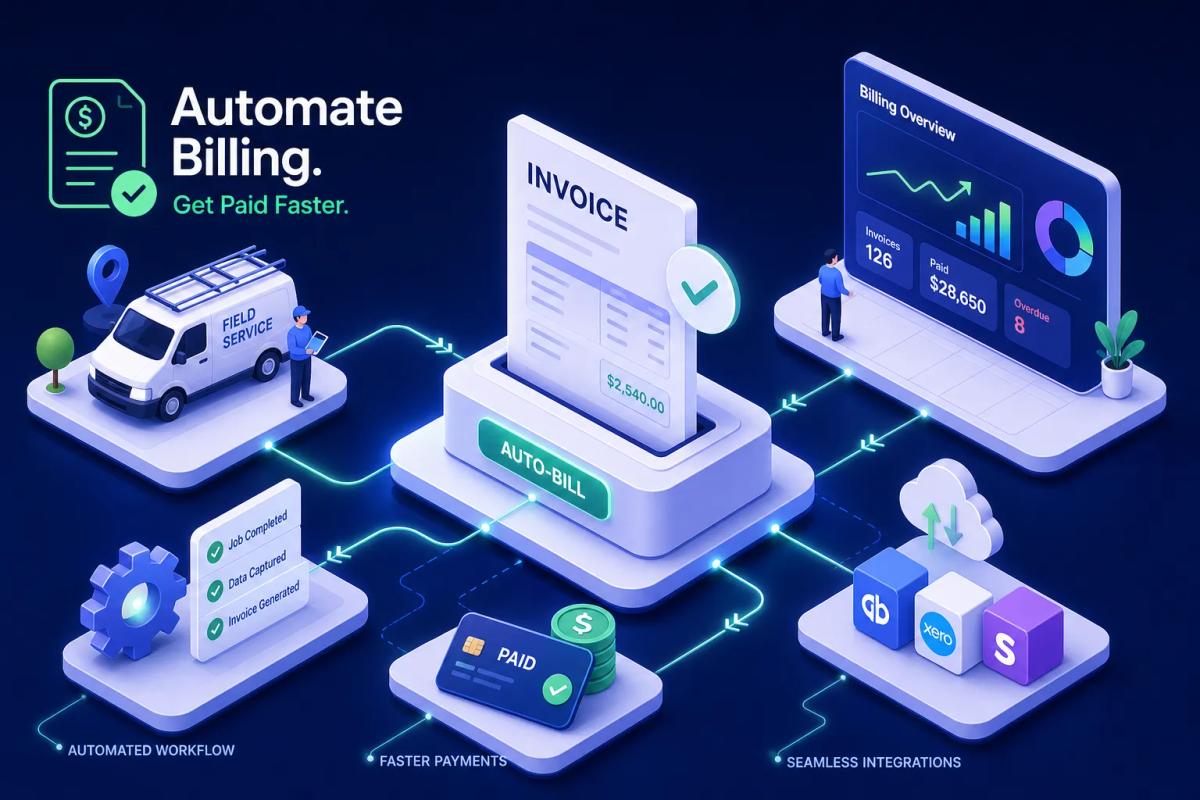
A technician finishes a job, loads up the truck, and drives to the next site. Back at the office, the invoice sits in a queue waiting for someone to pull the job notes, fill in the line items, and send it. That gap between job close and invoice delivery is where cash flow quietly bleeds out, and it's exactly the problem that automated billing software is built to solve. Invoice-delivery lag typically runs 3 to 5 days in field service operations, with some contractors reporting delays as long as 7 days. Many field service businesses never measure it because they're too busy running jobs to notice the pattern.
The problem is that most of what's marketed as billing automation was designed for SaaS companies managing subscription renewals, not contractors managing job cycles. The features that matter for a roofing or HVAC business, job-completion triggers, crew sign-off, real-time accounting sync, aren't standard in tools built for recurring software revenue. This guide breaks down what automated billing software actually means for field service work, which features to evaluate, what ROI to expect, and how to run a vendor trial that tells you something useful before you commit.
Why field service businesses keep losing money between job completion and payment
Field service businesses operate on job cycles, not billing periods. When a job closes, the clock starts on cash collection. Every day between job completion and invoice delivery is a day of free credit extended to the customer, and most businesses don't track it as a metric. Manual billing processes routinely push invoice delivery out by 3 to 7 days after job completion, sometimes longer when office staff are managing multiple crews simultaneously.
The cost of that lag compounds fast. AR automation benchmarks show that companies using manual billing see Days Sales Outstanding (DSO) run as much as 20% higher than businesses using invoice automation, with some documented cases showing up to 40% faster collections after switching. One widely cited example showed a company reduce DSO from 47 days to 28 days after adopting an automated billing platform, a 40% improvement in collection timing within six months. For a field service business doing $2M in annual revenue, that difference in receivables timing represents real working capital sitting idle in accounts receivable instead of in the bank.
The underlying problem isn't that field service owners don't care about billing speed; it's that most standalone billing tools automate the wrong step. They speed up invoice formatting after someone tells them the job is done. That's a faster manual process, not actual automation. The trigger, the condition that fires an invoice without a human initiating it, is what separates genuine billing automation from a digital version of the same manual handoff.
What automated billing software actually does for field-based work
There's a meaningful distinction between invoice automation and billing automation. Invoice automation generates a formatted invoice faster. Billing automation governs the entire billing lifecycle: when to invoice, what to include, how much to charge, how to collect payment, and how to record the transaction in your accounting system. For field service businesses, the lifecycle starts the moment a technician closes a job on a mobile device, not when office staff gets around to processing it.
A job-completion trigger fires an invoice automatically when specific conditions are met inside your job management workflow. That condition can be as simple as a technician marking a job "complete" on their phone, or as layered as a combination of conditions: job status changed, materials confirmed, customer signature collected. When those conditions are met, the invoice generates, populates with job data, and delivers to the customer. No office staff in the middle. No export file. No re-entry.
What billing automation doesn't replace is your pricing judgment and job costing decisions. The system executes the rules you configure: charge rates, tax logic, payment terms, staged billing conditions. Those rules reflect your business model. The platform's job is to apply them reliably at scale across every job your crews complete, not to make the decisions for you. That distinction matters when evaluating vendors: a good automated billing platform is a rules engine you control, not a black box that overrides your workflow.
The features that separate field-ready automated billing software from generic invoicing tools
Job-completion triggers with configurable rules are the most important feature for any field service billing platform. Look for trigger options tied to job status changes, crew sign-off, or customer approval, not just a generic "create invoice" button. The platform should also handle exceptions: partially completed jobs, staged billing for multi-phase projects like solar installations, and multi-visit service calls where billing occurs at specific milestones rather than at a single completion point.
Accounting sync quality matters more than vendors typically admit. Every field service billing platform claims accounting integration. The real difference is whether that integration runs in real time or on a batch schedule. A native accounting sync writes transaction data directly to QuickBooks or Xero the moment the invoice generates. Platforms that rely on third-party connectors introduce sync delays, field mapping errors, and reconciliation work that eats the time savings you were supposed to gain. For businesses managing active job billing alongside real bookkeeping, real-time sync keeps both systems accurate simultaneously.
Built-in payment processing closes the loop on invoice delivery. A payment automation software layer that sends invoices but hands off collection to a separate tool creates another gap in the workflow. Look for platforms that include built-in payment links, ACH and card acceptance, and automatic payment status updates that write back to the job record. When payment collection and invoice generation live in the same system, your accounts receivable updates itself.
Mobile-first billing matters because the most effective trigger lives at the job site, not at a desktop in the office. When a technician closes a job on their mobile device and the billing sequence fires from that action, you've eliminated the office step entirely. Consider what that means in practice: a technician finishes an HVAC installation, taps "complete" on their phone, and the customer receives an invoice with a payment link before the truck pulls out of the driveway. That's the real time savings, not faster invoice formatting, but removing the lag between field work and billing execution.
The real cost of running billing software that doesn't connect to your jobs
Most field service businesses at some point end up running separate tools for scheduling, job tracking, invoicing, and accounting. The workflow connecting those tools is almost always manual: someone exports a job list, someone creates invoices from it, a third person enters payment data into QuickBooks. Each handoff is a place where information gets lost, delayed, or entered incorrectly, and those errors compound into payment disputes that slow collection further.
Industry benchmarks on billing automation consistently show that companies running manual billing processes spend significantly more in administrative overhead than those with integrated systems, with documented cost reductions ranging from 20 to 70% after switching to automated invoicing software. One detailed case study reduced annual billing department operating costs by 74%, from roughly $494,000 to $126,000, with full cost recovery in seven months. Field service businesses don't need enterprise-scale billing infrastructure to see those kinds of returns. Eliminating 5 to 10 hours of weekly administrative billing work has measurable annual value, for a business paying $25 per hour in administrative wages, that's $6,500 to $13,000 recovered annually before counting error and dispute costs.
The hidden cost of disconnected billing is the payment chasing that comes after. When billing is separated from job records, following up on unpaid invoices requires office staff to cross-reference job data before they can even confirm what was done. That turns payment follow-up into a research project. Billing platforms that connect payment status to job records turn it into a dashboard view: overdue balances are visible, reminders fire automatically on defined schedules, and no one has to build a follow-up list by hand each week.
How automated billing software built into the job workflow actually looks
There's a fundamental difference between a platform that includes billing as a native module and one that integrates with a billing tool via API. Native billing means the invoice trigger, the job record, the customer data, the payment collection, and the accounting sync all live in one execution environment. Bolted-on billing means those functions live in separate systems that communicate, and every communication is a potential failure point: a sync delay, a data discrepancy, or reconciliation work you hadn't budgeted for.
To see what native billing looks like in practice, URBLD is one example worth examining. URBLD is built so that billing is part of the job execution sequence, not a downstream integration. When a job closes on the platform, the billing rules configured by the owner fire automatically. The invoice populates from job data, line items, materials, labor, and applicable taxes, then delivers to the customer and syncs to the connected accounting system in real time. There's no export, no manual trigger, no re-entry step. Payment collected through the built-in payment link updates the job record, the invoice status, and the accounting ledger simultaneously. For roofing, HVAC, solar, and home service businesses running multiple crews, that means invoicing happens at job speed, not office speed.
The owner sets the rules once: which job statuses trigger an invoice, what payment terms apply, which tax rates apply by job type or location, whether staged billing applies for multi-phase jobs. After configuration, the platform executes those rules on every job without manual oversight. That configuration flexibility matters because no two field service businesses bill exactly the same way. The platform should fit your model, not force you to adapt your billing logic to its defaults.
What the ROI data shows after companies adopt billing automation
The most consistent ROI driver across billing automation case studies is faster cash collection. One frequently cited example showed collection time drop from 47 days to 28 days, generating a 40% cash-flow improvement within six months and a reported 204% ROI with payback in month four. For a field service business doing $1M in annual revenue, that improvement in receivables timing releases real working capital that was previously sitting uncollected at any given point.
Labor and administrative cost reductions are the second major return. Companies that eliminate manual billing handoffs consistently report 20 to 70% reductions in billing-related administrative costs. The 74% department cost reduction example cited earlier, from roughly $494,000 to $126,000 annually, came almost entirely from eliminating manual re-entry and exception handling. Not from headcount cuts, but from removing work that shouldn't have required headcount in the first place. A survey by Ardent Partners found that 93% of businesses reported AR automation delivered the ROI they expected, and fully adopted teams saw a 40% or greater reduction in days to pay.
Error reduction compounds the financial return. Automated billing systems that pull data directly from job records eliminate the transcription errors that manual billing introduces. Industry benchmarks suggest billing automation can reduce invoice error rates by 60 to 80% in well-integrated deployments. Fewer errors mean fewer disputes, fewer payment holds, and faster collection cycles. One telecom case study reported 40% fewer disputes after implementing a recurring billing system, with ROI achieved within six months. The compounding effect of error reduction and faster triggering is why billing automation ROI tends to materialize quickly: most case studies show payback within 6 to 12 months.
How to vet vendors and build your shortlist
The field service billing evaluation starts with one question: does the invoice trigger connect to job status natively, or does it require a third-party integration? If the answer is "it integrates with your job management tool," that's a red flag for a bolted-on solution that will create the sync problems you're trying to eliminate. Every other feature question flows from that one.
Beyond the trigger architecture, your vendor evaluation should cover these points directly:
- Does accounting sync happen in real time, or on a batch/export schedule?
- Is payment processing built in, or does it hand off to another tool?
- Can billing rules be configured by job type, crew, or service category?
- Does the mobile experience support field-triggered billing, or is it desktop-only?
- What happens when a job is partially completed or requires staged invoicing?
On compliance, any platform handling payment data must hold current PCI DSS certification. Ask vendors for their Attestation of Compliance or Report on Compliance, not a checkbox on a marketing page. For platforms handling customer and job data, request a current SOC 2 Type II report and verify which Trust Services Criteria it covers. If the platform calculates and applies sales tax across multiple jurisdictions, verify that it handles multi-jurisdiction tax rules and maintains audit-ready transaction records. These aren't optional checks; they're the baseline for any platform touching your customer payment data.
Pricing structure varies widely across billing platforms. Stripe Billing charges 0.7% of revenue processed. Recurly starts at $249 per month. Chargebee at $599 per month. But those products are SaaS billing solutions built for subscription management, not field job billing. The more relevant cost calculation for a field service business is total cost of ownership: platform fee plus payment processing fees, minus the labor hours saved and minus the cost of errors and disputes eliminated. A platform with a higher monthly fee that includes native job integration can often carry a lower total cost than a cheaper tool that requires manual bridging between your job management system and your invoicing workflow, particularly once you account for the staff time spent on reconciliation and error correction.
Run your trial with real jobs, not demo data. As a suggested minimum, put at least five real jobs through the full billing sequence during your trial: job closed, invoice generated, payment collected, accounting updated. If any of those steps require a human action beyond closing the job, the automation is incomplete. Test the accounting sync with a real QuickBooks or Xero environment, not a sandbox, sync behavior in production environments often differs from demo conditions, and you want to see how the integration handles real customer records, real tax configurations, and real transaction data before you commit.
Frequently asked questions about automated billing software
How does automated billing software handle staged invoicing for multi-phase jobs?
Field-ready automated billing platforms let you configure milestone-based triggers rather than a single job-completion event. For a roofing or solar installation, you might set a trigger at deposit collection, another at material delivery confirmation, and a final trigger at crew sign-off. Each trigger generates a separate invoice for the corresponding amount. The platform applies the rules you configure, not a fixed template, so the billing sequence matches your contract structure rather than forcing your contracts to fit the software's defaults.
What's the difference between automated invoicing software and a full billing automation platform?
Automated invoicing software speeds up invoice generation after a human initiates the process. A billing automation platform, particularly one built for field service, governs the full cycle: when the invoice fires, what it includes, how payment is collected, and how the transaction records in your accounting system. The distinction matters because faster invoice creation still requires a manual trigger. True automation removes that trigger from the process entirely.
Can automated billing software integrate with QuickBooks or Xero for field service businesses?
Most platforms offer QuickBooks and Xero integration, but the quality varies significantly. The critical question is whether the sync runs in real time or on a batch schedule. Real-time sync writes transaction data the moment an invoice generates or payment posts. Batch sync, common with third-party connector tools, can introduce delays of hours or overnight, leaving your accounting records out of step with your job records. For active field service operations, that lag creates reconciliation work that offsets the administrative savings automation is supposed to deliver.
How long does it typically take to see ROI from billing automation?
Most documented case studies show payback within 6 to 12 months. The fastest returns come from two sources: faster cash collection (which improves working capital immediately as DSO drops) and reduced administrative labor (which shows up in the next payroll cycle after manual processes are eliminated). Error-related savings, fewer disputes, fewer payment holds, tend to accumulate over the first two to three months as the clean data from automated triggers replaces manually entered job information.
The bottom line for field service billing
Automated billing software for field service businesses is not the same product as billing automation for SaaS companies. The features that matter, job-completion triggers, real-time accounting sync, built-in payment processing, and mobile-first execution, are specific to how field work gets done. Platforms built for subscription billing lack those native connections, which means field service businesses end up bridging the gap manually and defeating the purpose of automation entirely.
The decision comes down to one question: is billing built into your job workflow, or is it a separate system you have to feed? If your billing sequence requires anyone in the office to touch a job after the technician drives away, you haven't automated billing, you've digitized a manual process. The ROI data is consistent: businesses that close that gap report collection times dropping by around 40%, administrative costs falling 20 to 70%, and error rates declining substantially. Those results reflect what happens when the trigger lives where the work happens.
If you want billing to run at job speed, without re-entry, without sync delays, and without office staff in the middle, hold vendors to the standard of native integration. That's the question worth asking on every sales call: show me the job status trigger, show me the accounting sync behavior in a production environment, and show me what happens when a job has an exception. If a vendor can answer all three clearly and demonstrate them in a trial, you have a real solution. If the answer involves a third-party connector or a nightly batch job, keep looking.
Explore the URBLD platform
CRM
Feature pages
CRM with Inventory Management
Glossary
Unsold Estimate
Glossary
How to Automate Field Service Billing
Solutions
FieldPulse Alternatives for Growing Service Teams
Comparisons
Invoicing & Billing
Feature pages
How to Reduce Lead Loss in Service Businesses
Solutions
ServiceTitan Alternatives for Growing Service Businesses
Comparisons
Found this useful? Share it with another contractor or service business owner.